
Direct Answer
Use separate virtual cards for eligible software workspaces, with a named owner and a record of each renewal. Check vendor acceptance before adding a prepaid card. This guide recommends an eight-field ledger and four spending limits: per-transaction, daily, monthly, and cumulative.
When Shared Cards Complicate Software Billing
Using separate cards for eligible software workspaces can reduce the number of tools affected when one card is compromised or replaced. When finance teams bind dozens of recurring subscriptions to one shared executive card, replacing that card can trigger cascading payment failures across engineering, product, and operations. This guide provides a vendor eligibility pre-check matrix, an eight-field software payment readiness ledger, and a four-limit control framework for business software spending.
Shared cards also complicate monthly statement reconciliation. A statement descriptor may identify a merchant without identifying the internal workspace. The descriptor strings in this guide’s diagrams are illustrative labels, not verified transaction records. When multiple squads share one card number across different workspaces, accounting teams may need invoices and workspace records to identify the correct cost center.
Uncapped shared cards further expose recurring renewals to unnoticed seat expansion and forgotten trials. A Card-on-File (COF) agreement lets a merchant store card credentials for future billing. A purchase started by the cardholder is a Cardholder-Initiated Transaction (CIT) and may trigger interactive verification. Subsequent renewals typically run as Merchant-Initiated Transactions (MIT, recurring charges processed without the buyer in session), so review renewals in the vendor portal as well as the card ledger.
Source: Adyen — Issuing 3D Secure for recurring merchant-initiated transactions and initial setup; HaiPay — Card-on-File for stored-card terminology. Accessed November 1, 2026.
- AI means artificial intelligence.
- API means application programming interface: software that lets applications communicate.
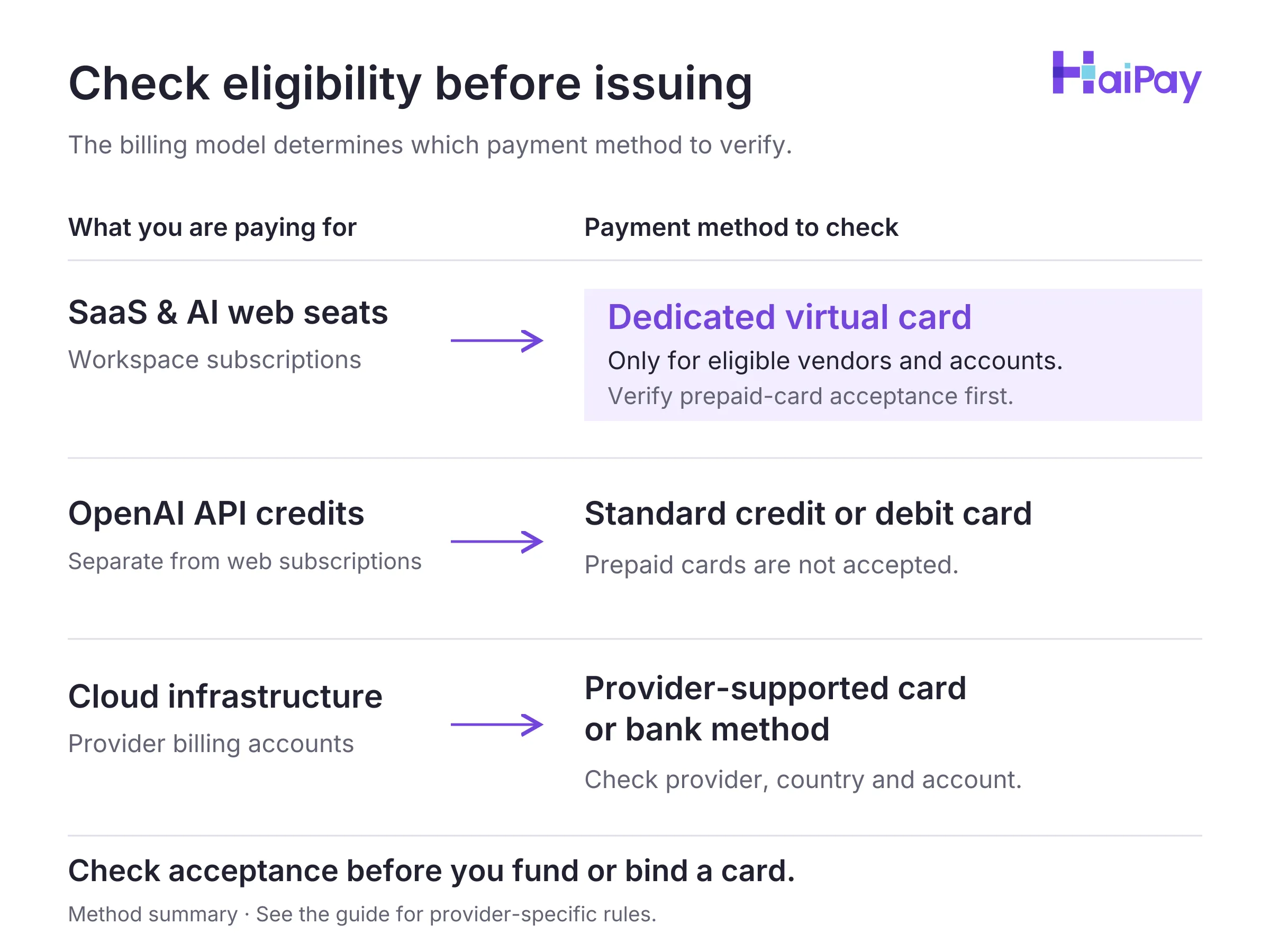
Figure 1: Check eligibility before issuing. Confirm vendor, country, account and funding-type acceptance before issuing. Open full-size diagram
Three Software Billing Models and Virtual Card Eligibility
Software as a service (SaaS) is software accessed through an ongoing service subscription. Before issuing a card, finance teams should distinguish the virtual card form factor from the card's funding classification. Here, virtual card (VCC) refers to a digitally issued card number; prepaid describes its funding arrangement. HaiPay's card issuing platform provides Visa and Mastercard prepaid virtual cards, where spending draws from a preloaded balance.
A card's BIN (Bank Identification Number, the first six or eight digits used to identify an issuing institution) helps identify the issuer. Card acceptance also depends on the vendor, account, region, and funding type. Visa documents both six-digit and eight-digit BINs. See how Principal Members license BIN ranges under BIN sponsorship.
Source: Visa — Numerics Initiative, accessed November 1, 2026.
Check eligibility separately for three software billing models:
- Fixed Recurring Seat Subscriptions: Collaborative SaaS tools and web-based AI seat plans bill a recurring monthly or annual fee per user or workspace. Check the specific vendor and account before using a prepaid card; this guide does not establish acceptance across SaaS vendors. At checkout, the card may need to pass 3-D Secure (
3DS, an online authentication protocol that verifies cardholder identity). - Prepaid API Credit Purchases: Developer API platforms often require organizations to buy credit balances upfront before consuming tokens. OpenAI explicitly excludes prepaid cards for API credit purchases. Check web-subscription acceptance separately.
- Postpay Cloud Infrastructure and Threshold Billing: Public cloud platforms accrue compute and storage consumption first. Collection schedules and threshold checks differ by provider. Azure threshold checks can be authorizations that are reversed without settlement. AWS, Google Cloud, and Azure publish different restrictions for their supported payment methods.
Software Billing Category | Official Prepaid & Virtual Card Rule (Checked Nov 1, 2026) | Recommended Payment & Control Setup |
|---|---|---|
SaaS & AI Web Seats (e.g., ChatGPT Web, Claude Pro or Max) | Check vendor acceptance, account region, and authentication requirements. ChatGPT web billing is separate from OpenAI API billing; that separation does not establish prepaid-card acceptance. | Issue one dedicated Visa or Mastercard prepaid virtual card per eligible workspace; verify applicable checkout tax on the vendor invoice before sizing limits. |
Developer API Credits (e.g., OpenAI API Prepaid Billing) | OpenAI explicitly states that prepaid cards cannot be used to purchase API credits; only standard credit or debit cards are supported. | Use a supported standard corporate credit or debit card for OpenAI API credits, and configure organization or project spend limits inside the API console. |
Public Cloud Postpay (e.g., AWS, Google Cloud Postpay, Microsoft Azure) | Azure rejects prepaid and virtual cards; Google Cloud Postpay rejects prepaid cards and two-factor debit cards; AWS rejects virtual credit cards ( against prepaid cards. | Keep primary cloud accounts on standard corporate credit cards or approved bank direct debit (
virtual cards only on eligible peripheral SaaS tools. |
Paid Software Pilots (e.g., 14-day or 30-day paid evaluations) | Acceptance depends on the vendor's payment processor and for recurring card-on-file trials. | Issue a dedicated prepaid virtual card with a cumulative limit capped at the approved pilot amount, and cancel the trial in the vendor portal if not adopted. |
Source: OpenAI — Separate billing systems, OpenAI — Spend limits, OpenAI Help Center — Why was my credit card declined?, AWS re:Post — Learn the accepted payment methods for AWS, Google Cloud Billing — Add, remove, or update a payment method, and Microsoft Learn — Troubleshoot a declined card at Azure sign-up, accessed November 1, 2026.
For a detailed comparison of AI web workspaces versus developer API credit wallets, see our guide on AI subscription and API payments. To review Seller of Record rules across AWS, Google Cloud, and Azure, consult virtual cards for cloud services.
The 8-Field Software Payment Readiness Ledger
Issuing virtual cards without a central registry merely replaces one consolidated corporate card statement with dozens of untracked cards. Before funding or binding a card to any software account, finance and information technology (IT) operations should record eight recommended fields in a shared software payment readiness ledger—see our corporate card program guide for close reconciliation.
For the workflow proposed here, use the platform Card ID (卡ID, the unique internal identifier assigned to each card by the issuing platform) paired with a structured card alias. Use the card's last four digits as a secondary visual check when reviewing merchant PDF invoices during payment gateway reconciliation.
Ledger Field & Purpose | Illustrative Example A (AI Team Seat — Not a Customer Log) | Illustrative Example B (DevOps SaaS — Not a Customer Log) |
|---|---|---|
1. Software Service & Descriptor Vendor name and expected bank statement descriptor | Service: Example AI Team Seat Descriptor: Example AI subscription (Illustrative setup) | Service: Team Workflow SaaS Descriptor: Vendor recurring string (Illustrative setup) |
2. Billing Model & Cadence Monthly seat, annual contract, or pilot fee | Monthly recurring seat:
= total | Monthly recurring workspace:
= total |
3. Account / Workspace ID Admin email, organization ID, or tenant slug | Workspace:
Tenant ID: | Workspace:
Tenant ID: |
4. Paying Legal Entity Subsidiary and cost center for tax booking | US Operating Entity
| UK Subsidiary
|
5. Platform Card ID & Alias Unique internal Card ID, alias, network, last 4 | Card ID: Alias: Mastercard Prepaid (last 4: | Card ID: Alias: Visa Prepaid (last 4:
|
6. Internal Owner Employee accountable for seats and invoices | Staff Platform Lead (Backup: Engineering Manager) | DevOps Team Lead (Backup: Finance Ops Lead) |
7. Card Balance & 4 Limits Preloaded balance plus 4 spending caps | Balance: Per-tx / Daily / Monthly: Cumulative (12 mo):
| Balance: Per-tx / Daily / Monthly: Cumulative (12 mo):
|
8. Invoice & Receipt Trail Vendor tax invoice paired with auth record | Monthly tax invoice ( matched to settlement | Monthly tax invoice ( matched to settlement |
Method: This eight-field ledger is an editorial recommendation, not a built-in platform report. All amounts, descriptors, and identifiers in Examples A and B are hypothetical, not vendor price quotations or customer transactions.
Recording the verified tax-inclusive invoice amount in Field 2 and Field 7 helps identify possible limit declines before renewal. Because software list prices may exclude tax, finance teams should check the vendor's checkout tax preview or prior tax invoice for the paying legal entity's jurisdiction.
In Illustrative Example A above, suppose a USD 20.00 monthly seat incurs USD 2.00 in applicable tax, resulting in a USD 22.00 charge. Setting the per-transaction limit to USD 20.00 would block the renewal. A USD 23.00 limit is 15% above the USD 20.00 base; USD 25.00 is 25% above it. Both exceed this example invoice. Approval still requires sufficient balance and capacity in every applicable quota. Either single-transaction cap would block an unapproved USD 200.00 plan upgrade.
Matching Card Controls to Software Lifecycle Events
Use card limits and renewal reviews together to control software spending. The HaiPay dashboard supports the limit and card-retirement controls described below. Do not infer equivalent API operations from dashboard controls.
Product scope: HaiPay product-team confirmation supplied to the editorial team on October 30, 2026 covers prepaid funding, dashboard limits, pending authorizations, and card retirement. These details do not establish equivalent API operations or guarantee acceptance by any software vendor.
Enforcing the Four Limit Dimensions and Pending-Authorization Rules
Each prepaid virtual card enforces four spending boundaries—a single-charge threshold evaluated per authorization plus three period or lifetime spend quotas. Authorized but unsettled (pending) transactions immediately occupy both the card's available balance and its applicable daily, monthly, and cumulative spend quotas:
- Per-Transaction Limit: Evaluates each individual authorization request against a single-charge ceiling (rather than a depleting balance). It blocks an annual-plan or upgrade charge if that charge exceeds the single-transaction cap.
- Daily Limit: Caps total approved spend within a single calendar day (a daily quota that resets on a next-day basis). Because the exact system timezone for the daily limit reset is currently unconfirmed, finance teams should leave a timing or amount buffer when multiple charges could occur across adjacent calendar days.
- Monthly Limit: Caps aggregate approved spend across a calendar month (a monthly quota), keeping mid-month seat additions within the approved workspace budget.
- Cumulative (All-Time) Limit: Tracks actual transaction amounts, including pending authorizations, across cycles. It does not add up the monthly limit ceilings. Check available capacity in the dashboard; the internal transition from pending hold to settlement is not specified here. In an illustrative scenario where a card bills
USD 22.00monthly for 12 months, cumulative spend reaches12 × USD 22.00 = USD 264.00. Even if the monthly limit isUSD 25.00, aUSD 300.00cumulative cap will not trigger at Month 12, so annual reviews need calendar reminders.
For detailed sizing arithmetic across monthly, annual, and pilot contracts, read our companion guide on software subscription payment controls.
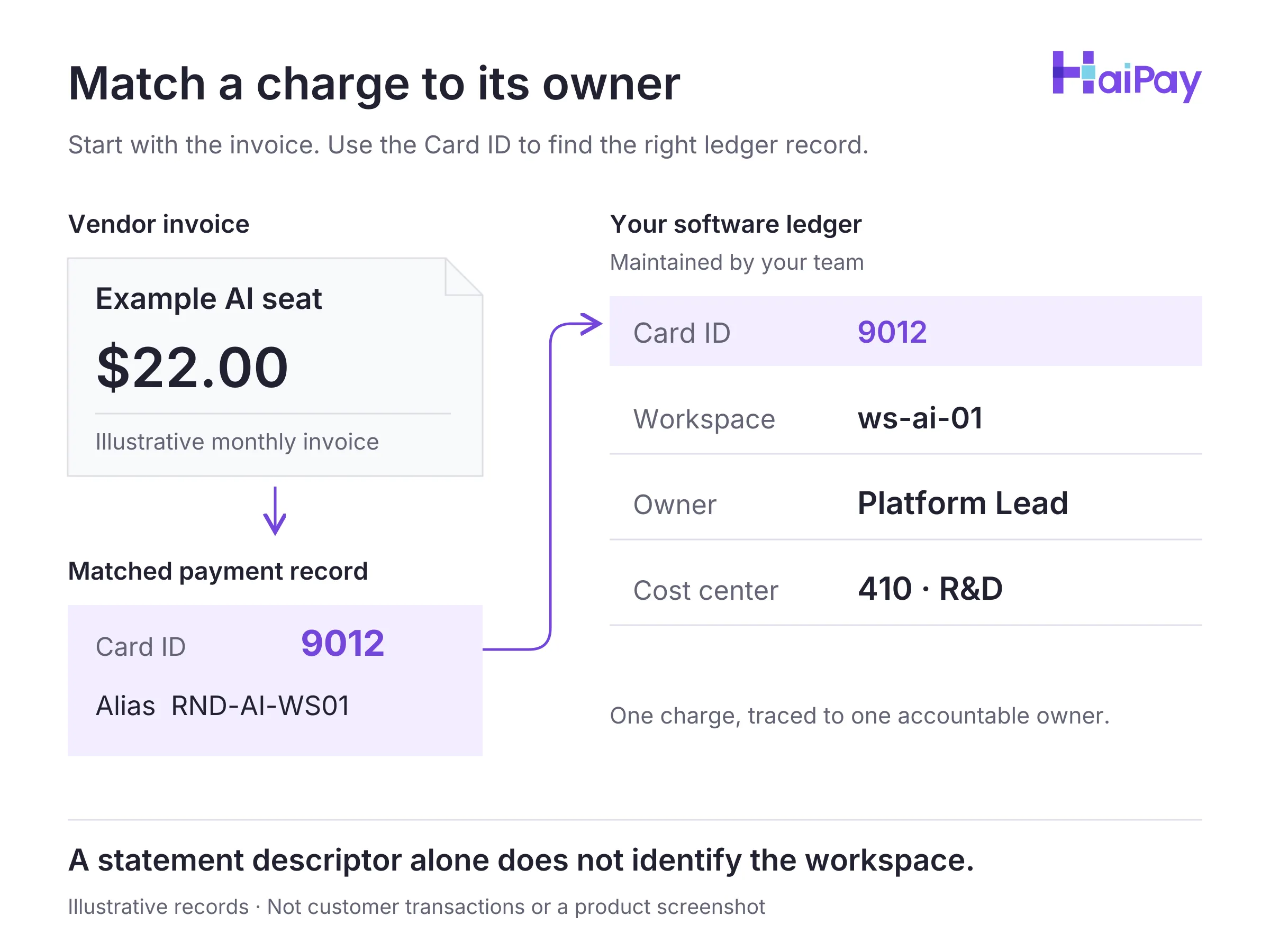
Figure 2: Match every payment to its owner. Eligibility and ledger illustration; no vendor acceptance guarantee. Invoice and record values are illustrative. Open full-size diagram
Source: Product-team confirmation, October 30, 2026; dashboard scope, not an API contract.
Managing Card States and Employee Offboarding
Administrators can transition virtual cards across four operational controls—Freeze, Unfreeze (for temporary project pauses under the same owner), Return Card Balance, and Close Card. When an employee leaves the company or a project finishes, teams should follow a strict retirement rule rather than passing the old card to a colleague:
- Freeze All Assigned Cards Immediately: Switch all virtual cards assigned to the departing employee or completed project to Frozen so new authorization attempts are blocked at the card layer. Remember that freezing a card does not cancel a commercial contract; if the subscription is ending, cancel it inside the vendor's billing portal as well.
- Confirm Pending Settlements and Resolve Refunds: Verify that all authorized pending transactions have settled and coordinate with support to resolve any outstanding refund questions. Closure timing depends on actual transaction settlement status rather than a fixed waiting period.
- Return Available Card Balance to the HaiPay Platform Balance: Once pending items have cleared, transfer the remaining available balance from the virtual card back to the platform balance.
- Close the Old Cards and Issue New Cards for Any New Owner: Permanently close the departing employee's old cards. If the software subscription remains active under a new internal owner, issue a new virtual card for the new owner and update the vendor's billing settings instead of unfreezing or transferring the old card.
Compare this workflow with virtual cards for advertising, where billing can depend on spend thresholds. For software, record the actual renewal schedule and investigate unexpected credit card decline codes.
How to Roll Out Virtual Cards Across AI, Cloud, and SaaS Stacks
Consider this phased rollout when moving software payments off shared cards:
- Audit 90 Days of Card Statements and Classify Vendors: Export three months of corporate card transactions to look for monthly and quarterly renewals; check contracts for dates outside that sample. Group every vendor into AI web seats, developer API credits, public cloud postpay accounts, or standard SaaS subscriptions.
- Verify Card Eligibility Before Issuing Replacement Cards: Check each vendor's official payment documentation against our AI subscription and API payments and virtual cards for cloud services guides. For OpenAI API credits, use a supported standard credit or debit card. For cloud services, select a supported card or bank method for that provider, region, and agreement.
- Populate the 8-Field Readiness Ledger and Issue Cards: Review the card issuing workflow, then create dedicated Visa or Mastercard prepaid virtual cards via the dashboard or the card issuing API. Record the platform Card ID (
卡ID), card alias, internal owner, and verified tax-inclusive limits before binding the card. - Enforce Calendar Renewal Reviews and Clean Offboarding: Schedule calendar reminders 30 days before annual renewal notice deadlines. When an employee leaves, freeze their cards, confirm pending settlements, return balances to the platform balance, close the old cards, and issue new cards for new owners.
Finance and engineering teams can issue dedicated Visa and Mastercard prepaid virtual cards with four-tier limit controls for eligible software expenses. Explore HaiPay's card issuing solution to structure your software payment governance.
Editorial & Financial Disclosure: HaiPay publishes this operational guide for general informational purposes. It does not constitute financial, legal, accounting, or tax advice. Vendor billing policies and card-network rules can change; always verify current terms in each provider's official billing documentation.
Source: Product-team confirmation, October 30, 2026; dashboard scope, not an API contract.
Sources
- OpenAI Help Center — Why was my credit card declined? (Accessed November 1, 2026)
- OpenAI Help Center — Managing billing for ChatGPT and the API platform (Accessed November 1, 2026)
- AWS re:Post Knowledge Center — Learn the accepted payment methods for AWS (Accessed November 1, 2026)
- Google Cloud Billing Documentation — Add, remove, or update a payment method (Accessed November 1, 2026)
- Microsoft Learn — Troubleshoot a declined card at Azure sign-up (Accessed November 1, 2026)
- Visa — Numerics Initiative (Accessed November 1, 2026)
- Privacy.com — Privacy Policy (Accessed November 1, 2026)
- Adyen — Issuing 3D Secure (Recurring authentication scope; accessed November 1, 2026)
- OpenAI — Spend limits (Organization/project controls; accessed November 1, 2026)
- HaiPay — Card-on-File (Stored-card terminology; accessed November 1, 2026)
FAQ
No. Eligibility depends on the vendor, account, region, and card type. OpenAI excludes prepaid cards for API credits. Azure excludes prepaid and virtual cards, while Google Cloud Postpay excludes prepaid cards.
Sources: OpenAI API payment policy, Azure payment policy, and Google Cloud payment methods, accessed November 1, 2026.
We recommend one card per eligible workspace when you need to retire or replace its payment method independently. Record the owner and invoice trail. Department-level cards may be simpler to maintain, but more tools can depend on the same card.
Method: Editorial workflow recommendation; choose the level of separation that fits your administrative capacity.
Tax is one possible cause. In a hypothetical example, a USD 20.00 base price plus USD 2.00 tax creates a USD 22.00 invoice. A USD 20.00 single-charge cap is too low. Check the actual invoice, balance, and every remaining quota before retrying.
Method: Editorial recommendation and illustrative arithmetic in this guide; not a customer dataset or vendor price quotation. Source: Product-team confirmation supplied to the editorial team, October 30, 2026. Scope: dashboard controls, not equivalent API operations.
Use the eight-field ledger proposed here to associate each platform Card ID and alias with a workspace, owner, and cost center. Then match the transaction to its invoice. Descriptors alone may not identify the correct workspace.
Method: This guide's editorial ledger design; not a built-in platform report.
Freeze all virtual cards assigned to the departing employee or completed project immediately. Confirm that pending transactions have settled, resolve any outstanding refund questions with support, return the available card balance to the platform balance, and close the old cards. If the subscription continues under a colleague, issue a new card for the new owner instead of transferring the old card.
Source: Product-team confirmation supplied to the editorial team, October 30, 2026. Scope: dashboard controls, not equivalent API operations.
For business software, evaluate ownership records, spending controls, invoice matching, and offboarding. A card marketed for privacy does not imply anonymous payment. For HaiPay, teams maintain their own ledger; the dashboard has user roles but no approval workflow or operation log.
Source: Product-team confirmation supplied to the editorial team, October 30, 2026. Scope: dashboard controls, not equivalent API operations. Privacy distinction: Privacy.com Privacy Policy, accessed November 1, 2026.

Related HaiPay surfaces
Explore the payment stack
Product
HaiPay virtual card issuing
Issue Visa and Mastercard prepaid virtual cards with four-tier spending limits and lifecycle controls.
Guide
AI subscription and API payments
Compare AI web seat subscriptions, prepaid API credit rules, and three-layer spend defenses.
Guide
Virtual cards for cloud services
Review dated AWS, Google Cloud, and Microsoft Azure payment eligibility rules and account isolation.
Guide
Software subscription payment controls
Configure per-transaction, daily, monthly, and cumulative limits and run a 4-step offboarding workflow.

Need help mapping your payment stack?
Talk to HaiPay about acquiring, orchestration, local methods, and payout workflows.
Contact us