


Credit Card Decline Codes: A Merchant's Guide to Reading Them as Risk Signals
Reviewed by Junseo










Last updated: August 20th, 2026
Declines as Risk Signals
A decline code is more useful as a pattern than as a label. The source layer, raw network response, retry category, and surrounding transaction history can tell merchants whether to fix their own integration, revalidate payment data, wait before retrying, or investigate potential dispute risk.
Credit Card Decline Codes: A Merchant’s Guide to Reading Them as Risk Signals
A credit card decline code tells you three things at once: which entity in the payment chain stopped the transaction, whether card network rules let you retry it, and — for a specific subset of codes — whether the same card is likely to arrive later as a dispute. Most decline-code references only cover the first. This guide covers all three, from the perspective of a merchant who has to decide what to do in the next ten minutes.
Where your decline code actually came from
Before you act on a code, establish who generated it. Three layers can stop a transaction, and they produce different codes with different remedies.
Layer 1 — Your gateway’s own risk rules. Stripe returns merchant_blacklist when a transaction matches your own Radar block list, and duplicate_transaction when it detects a near-identical charge. Neither of these ever reached a card network. No issuer declined anything. If you retry without changing your rules, you get the same result.
Layer 2 — Your acquirer or processor. Codes like authentication_required and mobile_device_authentication_required reflect a decision to enforce Strong Customer Authentication before the authorization goes out, or a step-up requested mid-flow. Similarly, incorrect_number and invalid_cvc can be caught by format validation before an authorization request is ever assembled.
Layer 3 — The issuer. This is the only layer where card network response codes exist. insufficient_funds, lost_card, do_not_honor — these correspond to numeric or alphanumeric codes the issuer sent back through VisaNet or an equivalent network switch.
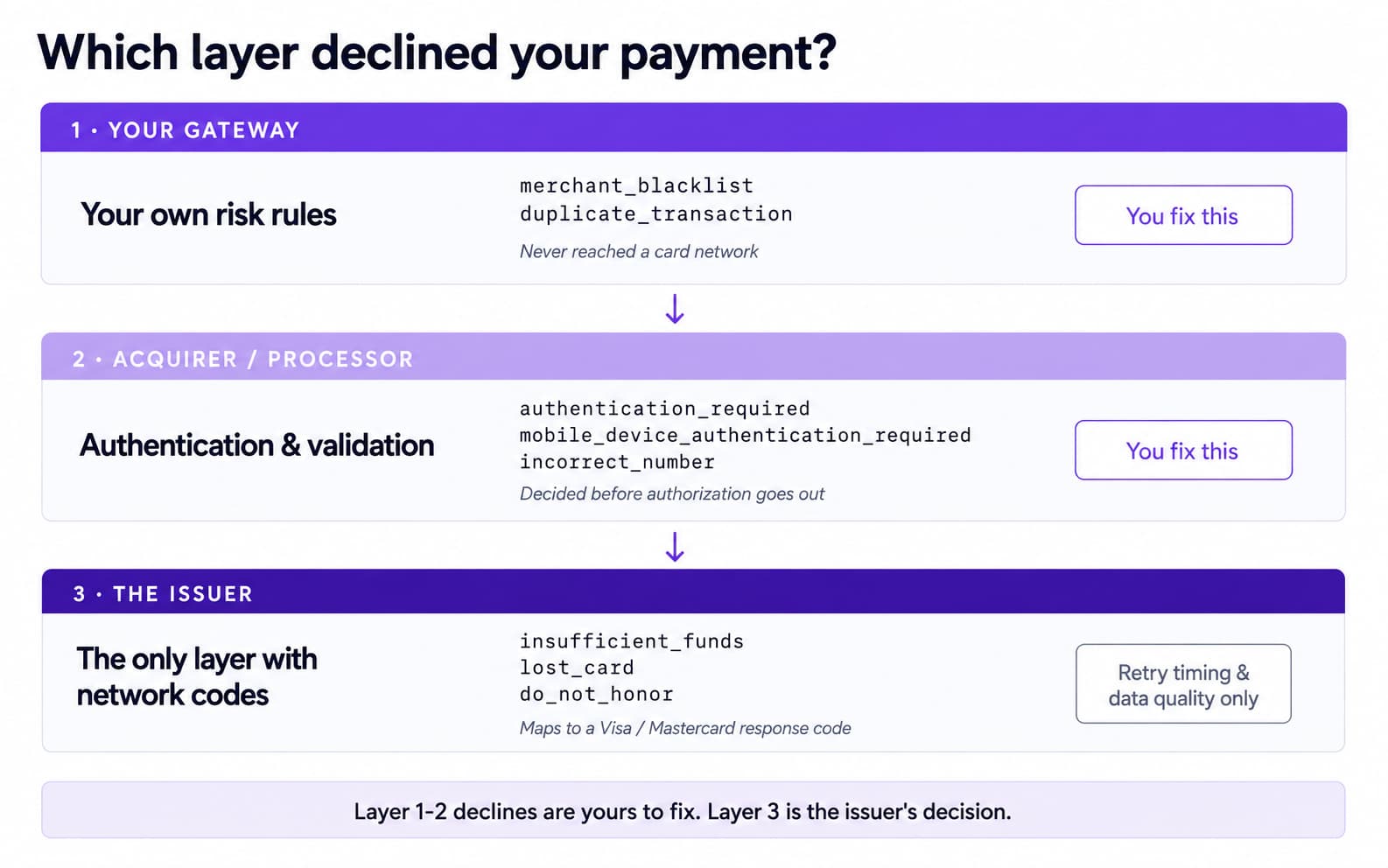
The practical consequence: a code from Layer 1 or Layer 2 is yours to fix. A code from Layer 3 is the issuer’s decision, and your only levers are retry timing, data quality, and whether you should retry at all.
One structural detail matters here. Stripe’s decline_code is a normalization layer. It maps responses from Visa, Mastercard, Amex, Discover, and others into one set of readable strings. Stripe documents the cost of this directly:
“The meaning of a code differs based on the card network. For this reason, take the card’s brand into consideration when interpreting the code.”
Two different network codes with different retry rules can arrive as the same Stripe string. That is why the next section maps strings back to the codes underneath them.
Also worth knowing before you tune timeouts: Visa rules require that “an Acquirer or a Merchant must not timeout a POS Transaction in less than 15 seconds” (Visa Core Rules, ID# 0030580, Edition Apr 2026; not applicable in the Europe Region). If your integration abandons authorizations at 10 seconds and logs them as declines, some of what you are calling a decline is your own timeout.
Stripe decline_code and the card network code underneath it
Neither Stripe nor Visa publishes a cross-reference between Stripe’s strings and Visa’s response codes. The table below builds one where the two definitions align at text level, and says so explicitly where they do not.
Stripe decline_code → Visa response code, with retry status and dispute-precursor flag
Last verified 2026-08-20. Organized per public Stripe and Visa documentation; the code an issuer actually returns depends on that issuer’s implementation.
Stripe decline_code | Visa code | Visa’s own description | Visa category | Retry permitted | Who declined | Dispute precursor |
lost_card | 41 | Lost card, pick up | 1 | Never | Issuer | Yes |
stolen_card | 43 | Stolen card, pick up | 1 | Never | Issuer | Yes |
pickup_card | 04 / 07 | 04 Pick up card (no fraud) · 07 Pick up card, special condition (fraud account) | 1 | Never | Issuer | Yes (07 is the fraud variant) |
invalid_account | 14 | Invalid account number (no such number) | 1 | Never | Issuer | No |
transaction_not_allowed | 57 | Transaction not permitted to cardholder | 1 | Never | Issuer | Context-dependent |
stop_payment_order | R0 | Stop payment order | 1 | Never | Issuer, on cardholder instruction | Yes |
revocation_of_authorization | R1 | Revocation of authorization order | 1 | Never | Issuer, on cardholder instruction | Yes |
revocation_of_all_authorizations | R3 | Revocation of all authorizations order | 1 | Never | Issuer, on cardholder instruction | Yes |
insufficient_funds | 51 | Not sufficient funds | 2 | Up to 20 in 30 calendar days | Issuer | No |
card_velocity_exceeded | 61 / 65 | 61 Exceeds approval amount limit · 65 Exceeds withdrawal frequency limit | 2 | Up to 20 in 30 calendar days | Issuer | No |
withdrawal_count_limit_exceeded | 65 | Exceeds withdrawal frequency limit | 2 | Up to 20 in 30 calendar days | Issuer | No |
restricted_card | 62 | Restricted card (card invalid in region or country) | 2 | Up to 20 in 30 calendar days | Issuer | No |
fraudulent | 59 / 83 | 59 Suspected fraud · 83 Fraud/Security (effective 25 July 2026, Visa use only) | 2 | Up to 20 in 30 calendar days | Issuer (59) / network (83) | Yes |
pin_try_exceeded | 75 | Allowable number of PIN-entry tries exceeded | 2 | Up to 20 in 30 calendar days | Issuer | No |
issuer_not_available | 91 | Issuer or switch inoperative | 2 | Up to 20 in 30 calendar days | Issuer infrastructure | No |
processing_error | 96 | System malfunction | 2 | Up to 20 in 30 calendar days | Issuer or acquirer | No |
reenter_transaction | 19 | Re-enter Transaction | 2 | Up to 20 in 30 calendar days | Issuer | No |
expired_card | 54 | Expired card or expiration date missing | 3 (data quality) | Up to 20 in 30 calendar days, after revalidating | Data quality | No |
incorrect_cvc | 82 / N7 | 82 Negative online CAM, dCVV, iCVV, or CVV results · N7 Decline for CVV2 failure | 3 (data quality) | Up to 20 in 30 calendar days, after revalidating | Data quality | No |
incorrect_pin | 55 | PIN incorrect or missing | 3 (data quality) | Up to 20 in 30 calendar days, after revalidating | Data quality | No |
incorrect_address | 6P | Verification Failed (cardholder identification does not match issuer records) | 3 (data quality) | Up to 20 in 30 calendar days, after revalidating | Data quality (AVS) | No |
do_not_honor | 05 | Do not honor | 4 (generic) | Up to 20 in 30 calendar days | Issuer, reason not disclosed | Rate change is the signal |
generic_decline | 05 or any code outside categories 1–3 | Visa instructs issuers to limit category 4 to transactions where no other value applies | 4 (generic) | Up to 20 in 30 calendar days | Unknown | Rate change is the signal |
call_issuer | no published mapping | — | Likely 2, unconfirmed | Treat as category 2 | Issuer | Context-dependent |
merchant_blacklist | not a network code | Stripe Radar block list match | — | Change your rule, not the retry | Your gateway | No |
duplicate_transaction | not a network code | Stripe-side duplicate detection | — | Do not retry | Your gateway | No |
authentication_required | not a network code | SCA step-up decision | — | Complete authentication | Acquirer / gateway | No |
Codes appearing in Stripe’s list without a definition-level Visa match — approve_with_id, card_not_supported, currency_not_supported, invalid_amount, new_account_information_available, no_action_taken, not_permitted, offline_pin_required, service_not_allowed, security_violation, incorrect_number, invalid_cvc, mobile_device_authentication_required — are left unmapped deliberately. Stripe builds these strings from several card networks at once, and guessing at the code underneath one of them would defeat the purpose of the table. Where you need certainty, log network_decline_code and read the raw value.
Three rows change what you do, so they are worth stating outright.
expired_card is classified as a data quality problem, not an expiry fact. Visa places code 54 (Expired card or expiration date missing) in Category 3, labelled “Data quality – Revalidate payment information.” The rule text treats it as a signal to revalidate the payment credential, not proof that the card is dead. Merchants report receiving expired_card on cards that had not expired. If you auto-cancel subscriptions on this code, you are cancelling some customers who still have a valid card.
insufficient_funds does not always mean the account is empty. Visa rules for Visa Infinite Corporate Card specify that an authorization “must only be declined with response code 51 (Not Sufficient Funds)” when the transaction would push the balance past the approved credit limit by 20% or more, among other conditions. Code 51 is a threshold decision defined by issuer policy, not a balance readout.
do_not_honor and generic_decline are the category with no information in them. Visa’s Category 4 is “Generic response codes,” which issuers are instructed to limit “to transactions where no other value applies.” Stripe describes the same situation from its side: “Card issuers categorize most declines as generic (generic_decline), making the exact decline reason unclear.” When you get 05, you have not learned why. You have learned that the issuer chose not to tell you.
Organized per public Stripe and Visa documentation as of 2026-08-20. The code an issuer actually returns depends on that issuer’s implementation.
Soft vs hard declines: what you may retry, what you must not
The soft/hard distinction is usually presented as a rule of thumb. For Visa transactions it is an actual published rule with an actual number attached.
Visa Table 7-2 sorts decline response codes into four categories. Category 1 is the hard-decline set. The rule is unambiguous:
“After receiving a Category 1 Decline Response code, a Merchant must never resubmit an Authorization Request or Account Verification for the same Payment Credential.”
Category 1 covers: 04 and 07 (pick up card), 12 (invalid transaction), 14 (invalid account number), 15 (no such issuer), 41 (lost card, pick up), 43 (stolen card, pick up), 46 (closed account), 57 (transaction not permitted to cardholder), and R0/R1/R3 (stop payment and revocation of authorization orders). Issuers are also required to keep sending the same code consistently once they have sent a Category 1 response — so a retry will not produce a different answer.
Categories 2, 3, and 4 permit reattempts, with a stated ceiling:
“Reattempt permitted (up to 20 attempts in 30 days)”
That ceiling is not a target. Stripe’s guidance for the same situation is materially tighter:
“Card networks limit the number of times you can reattempt a single charge. We recommend a maximum of eight retries for charges that permit retries. Card issuers might see creating additional retries as potential fraud, which can result in increased declines for legitimate charges.”
Read those two together: 20 per 30 calendar days is the rule ceiling, 8 is the processor’s practical recommendation, and the gap between them is space where your retry logic can generate fraud signals against your own legitimate charges. Build to the recommendation, not the ceiling.
One code to note if your ruleset was written before this summer: Visa added 83 (Fraud/Security) to Category 2 effective 25 July 2026. If your retry logic enumerates Category 2 codes explicitly, 83 may be missing from it.
Source for the categories and the retry ceiling: Visa Core Rules and Visa Product and Service Rules, Section 7.3.6.3 “Use of Authorization Response Codes,” Table 7-2, ID# 0030640, Edition April 2026. We describe what the published rule says; we do not interpret it on the card network’s behalf.
Decline patterns that precede disputes
Most decline codes are operational noise. A small set is early warning. The difference is not severity — it is whether the code implies a third party is using the card, or that the cardholder has already tried to stop you.
Codes that say someone else is holding the card. lost_card (Visa 41), stolen_card (Visa 43), and pickup_card (Visa 04 and 07, where 07 is explicitly the fraud-account variant) all describe a card the issuer wants out of circulation. If one of these arrives on an order, the same card details are in the hands of someone who is not the cardholder. Your other orders from that session, that device, or that BIN in the same window deserve a look before they ship, not after they charge back.
Codes that say the cardholder already told the issuer to stop you. stop_payment_order, revocation_of_authorization, and revocation_of_all_authorizations map to Visa R0, R1, and R3. Operationally, one of these means the cardholder went to their issuer to shut off payments — either to you specifically or to every merchant. This is the code most directly upstream of a dispute, because the cardholder has already escalated once and did not come to you first. A retry here does not just fail; it documents that you kept charging after being cut off.
fraudulent. Stripe returns this when its own risk layer or the issuer flags the transaction. Visa 59 (Suspected fraud) is issuer-side; 83 (Fraud/Security) is network-side. Either way, this is a fraud judgment recorded against the transaction.
A surge in do_not_honor. Individually 05 tells you nothing. As a rate change against a stable baseline, it tells you something has shifted — issuer-side risk scoring on your merchant category, a new traffic source with different card quality, or a testing pattern probing your checkout. The signal is in the derivative, not the code.
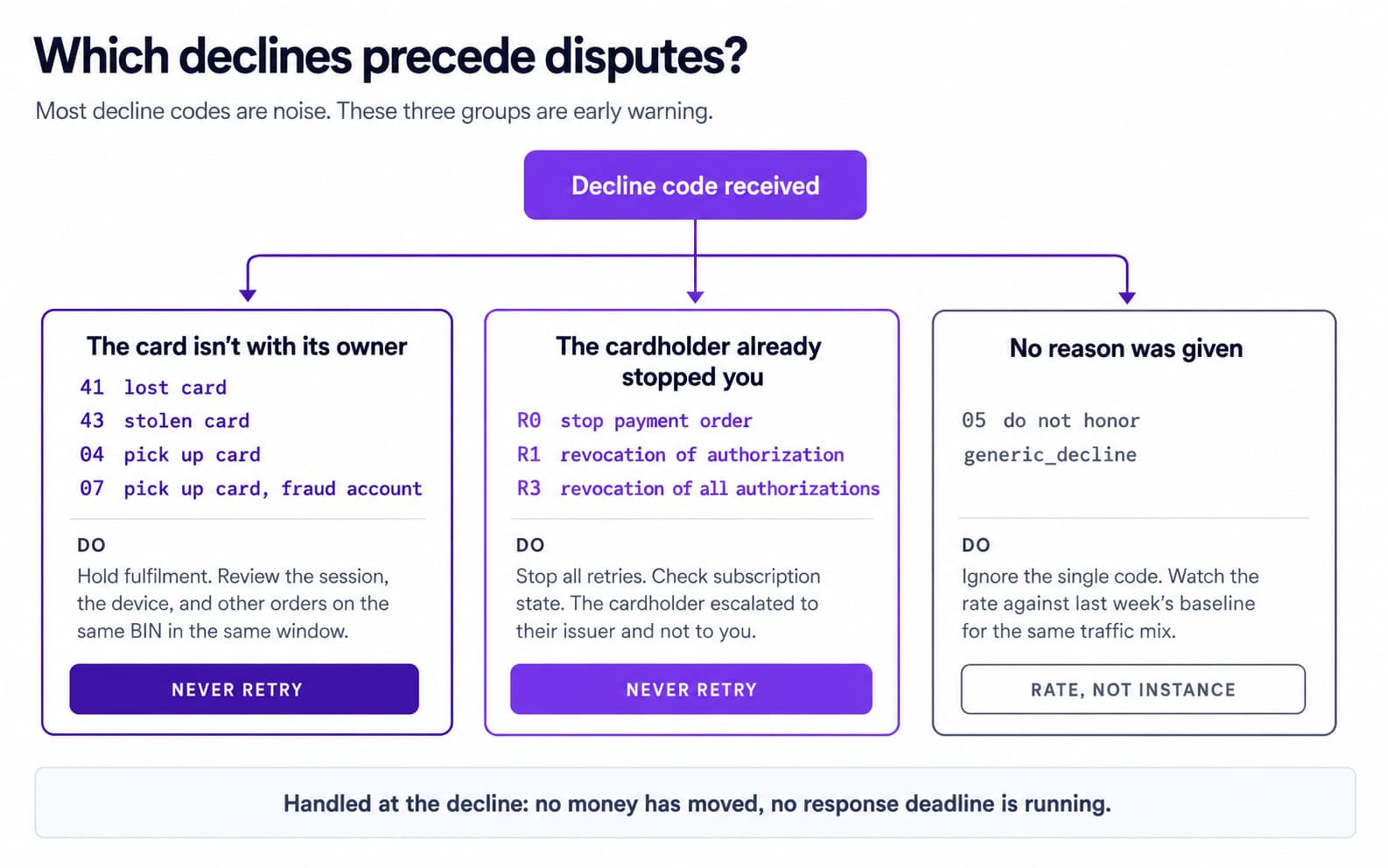
The practical reading: single occurrences of these codes are a decision about one order. A cluster is a decision about your risk configuration. Both are cheaper to handle at the decline than at the dispute, because at the decline stage no money has moved and no representment deadline is running.
For how a dispute proceeds once one is filed, and what evidence windows apply, see https://www.haipay.net/guides/chargeback-process.
What to log so patterns stay visible
You cannot see patterns in fields you did not store. Minimum per declined authorization:
· decline_code — Stripe’s normalized string.
· network_decline_code — the raw code from the card network, where your processor exposes it. This is the field that survives Stripe’s normalization layer. Without it, expired_card and a Category 3 revalidation request are indistinguishable in your logs.
· Timestamp with timezone — retry-window rules are counted in days, and “20 attempts in 30 days” is unauditable against naive local timestamps.
· Card BIN — the issuing bank and card product. Attribution questions (“is this one issuer or all of them?”) are unanswerable without it.
· Retry count and retry parentage — which attempt this was, and which original charge it descends from.
· ARN, once an authorization succeeds and settles — the identifier that lets you tie a later dispute back to this transaction record. See https://www.haipay.net/guides/acquirer-reference-number.
· The layer that declined — gateway, acquirer, or issuer, per the attribution logic above. Store it as a field rather than re-deriving it later.
Store these per attempt, not per order. Collapsing three attempts into one row destroys exactly the retry pattern you would want to audit.
A 24-hour triage runbook: from code to action
Two paths, because a single decline and a rate change are different problems.
Path A — One transaction, one code
1. Identify the layer. Gateway or acquirer code? Fix your side; the issuer never saw it. Issuer code? Continue.
2. Look up the Visa category in the mapping table. Category 1 ends the path: do not retry this payment credential, and do not queue it for a nightly retry job either. Categories 2, 3, and 4 continue.
3. For Category 3, revalidate before retrying. These are data quality codes. Re-collect the expiry date, CVC, or billing address rather than resubmitting the same payload. Retrying identical data against a data-quality decline is the most common wasted attempt.
4. For Category 2, wait before retrying. These are time-dependent conditions. An immediate retry against 51 or 61 tests nothing that changed.
5. For Category 4, decide on evidence you have, not the code. 05 carries no information. Use order value, customer history, and BIN rather than reading meaning into the code.
6. Check the dispute-precursor column. If the code is in that set, handle the order — hold fulfilment, review the session — regardless of whether a retry is technically permitted.
Path B — A batch, a rate change, or a surge
1. Establish the baseline first. A decline rate is meaningless without last week’s number for the same traffic mix.
2. Segment before diagnosing. Split by BIN, issuer country, card product, traffic source, and product SKU. A surge concentrated in one BIN range is an issuer conversation. A surge spread evenly across issuers is usually your own change — a new checkout deploy, a pricing change, a new acquisition channel.
3. Correlate against your own deploy log. Authentication and validation codes moving together shortly after a release points at your integration, not the market.
4. Check whether the surge is in dispute-precursor codes specifically. A rise in 41/43/04/07 is a fraud pattern arriving at your checkout. A rise in 51 and 61 is not. These need different responses and should not be aggregated into one “decline rate” metric.
5. Pause automated retries for the affected segment while you diagnose. A retry job running against a surge multiplies the attempt count against the same issuers at exactly the moment they are already declining you.
What not to do
Do not run blind retry loops. The rule ceiling is 20 attempts in 30 calendar days; Stripe recommends a maximum of eight; and Stripe explicitly warns that additional retries “might” be read as potential fraud, “which can result in increased declines for legitimate charges.” A loop that retries to the ceiling is not maximizing recovery — it is generating a signal against itself. Retries also must never touch Category 1 codes at all.
Do not force 3-D Secure across all traffic as a decline fix. Authentication changes who bears liability and adds friction at checkout; it is not a general remedy for declines whose causes sit in data quality or issuer thresholds. Applied indiscriminately it moves your problem from declined authorizations to abandoned checkouts.
Do not block a whole BIN because a few transactions declined. A BIN is an issuer and card product, often covering a large share of a country’s cardholders. Blocking at BIN granularity to solve a handful of declines removes legitimate customers who would have paid. Segment first, and if a BIN genuinely warrants action, scope it to the specific product or amount range that showed the pattern.
Do not treat expired_card as authoritative for subscription cancellation. Visa classifies the underlying code as a revalidation request. Prompt for updated details before you cancel.
FAQ
Visa code 82 covers negative online CAM, dCVV, iCVV, or CVV results. Visa places it in Category 3, "Data quality – Revalidate payment information," so reattempts are permitted within the published ceiling. Practically, the card verification value did not check out — re-collect it rather than resubmitting the same value.
It depends on the category, not on the fact of the decline. Visa Category 1 codes must never be resubmitted for the same payment credential. Categories 2, 3, and 4 permit reattempts up to 20 in 30 calendar days under Visa rules, though Stripe recommends a maximum of eight. For Category 3, revalidate the data before retrying rather than resubmitting the same payload.
For Visa transactions the distinction maps to published categories. Hard declines are Category 1: the issuer will not approve, must keep returning the same code, and the merchant must never resubmit. Soft declines are Categories 2, 3, and 4: the condition is temporary, a data problem, or unstated, and reattempts are permitted within limits.
Because none was sent. Visa's Category 4 is reserved for cases where no other code applies, and Stripe notes that issuers categorize most declines as generic, making the exact decline reason unclear. Treat a single 05 as no information and a change in your 05 rate as the actual signal.
The set that implies the card is not with its owner, or that the cardholder has already acted against you: 41 (lost card), 43 (stolen card), 04 and 07 (pick up card, with 07 flagged as a fraud account), R0/R1/R3 (stop payment and revocation orders), and fraud codes 59 and 83. A rate change in 05 is worth investigating even though 05 itself carries no reason.
No. The mapping table covers Visa, because Visa publishes its rules openly. Mastercard uses a different structure and refers to its network advice codes as Merchant Advice Codes. We have not published a Mastercard mapping because we do not currently have a verifiable public source for one.
