
Direct Answer
Check AI subscriptions and developer usage separately: OpenAI and Claude operate distinct billing systems for these services. OpenAI does not accept prepaid cards for API credit purchases. Verify each web subscription's payment requirements, then combine card limits with the relevant platform controls.
Why AI Web Subscriptions and API Billing Require Separate Payment Checks
OpenAI and Claude operate separate billing systems for chat workspaces and developer application programming interfaces (APIs), so a payment card accepted for a monthly seat can still be rejected on an API credit purchase. Do not assume that a chat subscription and a developer account share one wallet or accept identical payment methods. This guide maps the account-to-billing boundaries across major AI platforms, explains how to layer card limits with platform spend controls, and provides a diagnostic checklist for payment declines.
OpenAI documents separate billing systems for ChatGPT and the API platform. API credits belong to an API organization at platform.openai.com, separately from a ChatGPT web subscription. Even when a workspace plan includes promotional API credits, subsequent API consumption is billed separately through the API organization's payment settings. Crucially, OpenAI's payment troubleshooting documentation states that prepaid cards cannot be used to purchase API credits; only standard credit or debit cards are supported.
Anthropic enforces a similar architectural boundary between consumer or team subscriptions and developer console usage. Under Anthropic's Claude Code billing rules, Claude Pro and Max plans share five-hour session limits and weekly usage limits across web, desktop, terminal, and supported IDEs (Integrated Development Environments). Common supported IDEs include VS Code, Cursor, and JetBrains editors. By contrast, Claude Console pay-as-you-go API billing runs as an independent system with its own credit balance and auto-reload settings.
Source: OpenAI Help Center — Managing billing for ChatGPT and the API platform, OpenAI Help Center — Why was my credit card declined?, Anthropic Support — Use Claude Code with your Pro or Max plan, and Claude Support — API key environment variables, accessed November 1, 2026.
Account-to-Billing Mapping Across Major AI Tools
Here, virtual card refers to a digitally issued card number; prepaid describes its funding arrangement. The virtual format alone does not establish vendor acceptance. HaiPay programs covered here use Visa and Mastercard prepaid cards. A bank identification number (BIN) identifies an issuing institution; Visa uses six-digit and eight-digit BINs.
Source: Visa — Numerics Initiative, accessed November 1, 2026. Funding classification: HaiPay product-team confirmation, October 30, 2026.
Before issuing a prepaid virtual card for an AI tool, administrators must verify which admin console governs billing and whether prepaid BIN ranges are accepted. Record both tables below in your virtual cards for software payments readiness ledger so engineers never bind an unsupported card to an API organization.
AI Product & Admin Path | Charge Structure & Billing Scope | Official Card & Auth Rule (Checked Nov 1, 2026) |
|---|---|---|
ChatGPT Web Plans (Plus, Pro, Business, Enterprise, Edu; Settings > Billing or
| Consumer web plans: manage the subscription in Settings > Billing. Business: only workspace owners can update payment details. Enterprise/Edu: available controls depend on plan and permissions. | Card must be issued by a bank in an OpenAI-supported country or region and pass 3-D Secure ( Strong Customer Authentication ( when challenged. |
OpenAI API Platform (Prepaid Billing at
managed by org owners) | Upfront credit purchase ( default; credits expire after 1 year; refunds are subject to OpenAI's stated legal, contractual, and approved exceptions). | Prepaid cards are prohibited: OpenAI explicitly states prepaid cards cannot buy API credits; only standard credit or debit cards are accepted. |
Claude Pro & Max Plans (Web, Desktop, Terminal & IDE via Claude Code; Claude account billing) | Fixed recurring subscription covering shared 5-hour session and weekly usage limits. | Subject to issuer approval for online recurring transactions and regional checkout verification. |
Claude Console / API (Pay-As-You-Go & Auto-Reload in Claude Console Billing) | Usage-based API billing with optional auto-reload when the Console credit balance drops below the configured threshold. | Managed independently in Claude Console; when enabled, auto-reload purchases credits according to the configured threshold and target balance. |
AI Product & Surface | Key Operational Risk to Audit | Recommended Governance Action |
|---|---|---|
ChatGPT Web Plans | Subscriptions on multiple platforms (web, Apple App Store, Google Play Store) may produce separate charges. | Centralize team seats under one web workspace owner and assign a dedicated virtual card recorded by platform Card ID ( alias. |
OpenAI API Platform |
enabled by default during prepaid setup; shutoff delays can also create a negative credit balance deducted from the next purchase. | Assign a standard corporate credit or debit card, review the
at setup, and configure organization hard spend limits. |
Claude Pro & Max Plans | Monthly API credits included with Max plans cannot be used in Claude Code or Claude apps, including for extra usage credits. | Size card per-transaction and monthly limits to the verified tax-inclusive subscription price and separately review any extra-usage settings. A top-up can still pass if it fits within the remaining card limits. |
Claude Console / API | If an environment variable is present, Claude Code bills the API key at per-token rates instead of the Pro/Max plan. | Audit developer terminal environments and shell profiles so local coding sessions authenticate via subscription login rather than API keys. |
Source: OpenAI Help Center — Setting up and managing prepaid API billing, OpenAI Help Center — Managing billing for ChatGPT and the API platform, Anthropic Support — Use Claude Code with your Pro or Max plan, and Claude Support — API key environment variables, accessed November 1, 2026.
Preventing Accidental API Billing in Developer Terminals
A command-line interface (CLI) lets developers enter commands in a terminal.
Switching between subscription login and API-key authentication can change which account pays for a coding session. Anthropic's official documentation notes that if an ANTHROPIC_API_KEY environment variable is set in a developer's environment, Claude Code authenticates with that API key instead of the user's Claude Pro, Max, Team, or Enterprise subscription.
Billable API usage then draws on Claude Console billing. If auto-reload is enabled, it can purchase credits when the configured balance threshold is reached. Authentication alone does not mean every prompt is charged. To keep terminal coding inside a subscription allocation, engineers should follow Anthropic's documented verification steps:
- Check the active authentication method inside Claude Code by running the in-session slash command
/status. - Remove the
ANTHROPIC_API_KEYenvironment variable from both the current terminal session and persistent shell configuration files such as~/.zshrcor~/.bashrc, then open a fresh terminal window. - Inside Claude Code, run the slash command
/logoutand then/loginto re-authenticate with Claude subscription credentials, and decline API credit prompts when five-hour session limits are reached.
Source: Claude Support — Managing API key environment variables in Claude Code and Claude Support — API usage billing, accessed November 1, 2026.
Three-Layer Spend Defense: Card Limits, Prepaid Credits, and API Spend Limits
Do not treat an API credit balance as equivalent to a payment card's authorization controls. OpenAI's prepaid API billing documentation warns that API access may not stop immediately when prepaid credits run out (credit_balance_exhausted). Usage processed during that brief shutoff delay is recorded as a negative credit balance, which OpenAI automatically deducts from the next credit purchase.
Furthermore, OpenAI distinguishes three separate platform-side controls across its prepaid billing and API spend-limits documentation:
- Prepaid Monthly Recharge Limit: Restricts only how much money automatic recharges (
Use auto-reload) can purchase each month. Manual credit purchases do not count toward this recharge limit, and existing credits can still be spent. - Organization and Project Spend Limits (alerts vs. hard limits): Open Organization limits or Project settings > Limits, then use Spend > Edit spend limit. Spend alerts notify administrators without stopping traffic. Choosing
Enforce a hard limitblocks subsequent API requests with an HTTP429error (organization_spend_limit_exceededorproject_spend_limit_exceeded), though OpenAI notes there is a brief propagation delay before enforcement takes effect. - OpenAI-Assigned Tier Usage Limits: OpenAI assigns an approved monthly organization usage limit separately from the spend limits you configure. Check the error code to distinguish a tier usage limit from a custom spend cap.
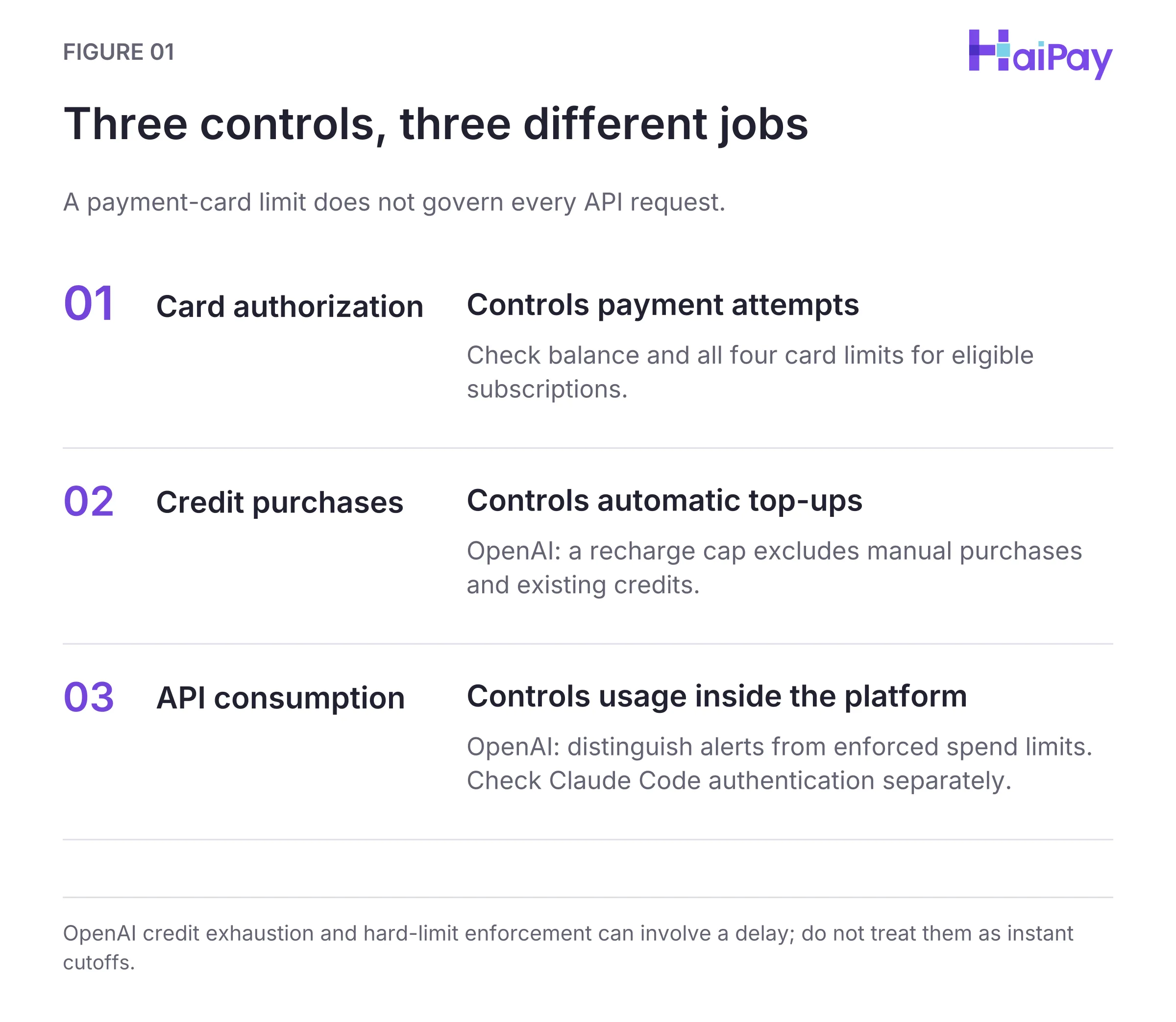
Figure 1: Three controls, three different jobs. OpenAI credit exhaustion and hard-limit enforcement can involve a delay; do not treat them as instant cutoffs. Open full-size diagram
To prevent runaway AI costs, finance and engineering teams should combine three control layers:
- Layer 1 — Payment Card Balance and Four Limit Types: On eligible AI web subscriptions paid via a virtual card issuing program, enforce per-transaction, daily, monthly, and cumulative card limits. Remember that the per-transaction limit is evaluated per authorization request, while authorized pending transactions immediately occupy both available card balance and applicable daily, monthly, and cumulative spend quotas. In an illustrative example (not a customer transaction), suppose a
USD 20.00monthly seat carriesUSD 2.00in tax (USD 22.00billed total). A card capped atUSD 25.00per transaction (+25%over base) is above this example renewal amount and below an unapprovedUSD 200.00upgrade. - Layer 2 — Platform Prepaid Credit & Auto-Reload Controls: OpenAI API credits require a supported credit or debit card. Check
Use auto-reloadat setup ($5minimum,$10default), then configure a monthly recharge limit. Most Claude Console organizations use prepaid credits; some have monthly invoicing. For prepaid billing, review the optionalAuto-reloadthreshold and target balance. Consider disabling reload on sandbox workspaces. - Layer 3 — OpenAI Hard Spend Caps and Claude Code CLI Hygiene: These are two distinct platform controls. In
platform.openai.com, enableEnforce a hard limitat the organization and project levels so excess API requests are rejected (HTTP 429). In Claude Code, run/statusto check authentication. IfANTHROPIC_API_KEYis present, unset it and run/logoutfollowed by/loginto use the subscription instead of API credits.
Source: OpenAI Help Center — Setting up and managing prepaid API billing, OpenAI API Documentation — Spend limits, Anthropic Support — How do I pay for my Claude API usage?, and Claude Support — API key environment variables, accessed November 1, 2026. Card-limit rules: HaiPay product-team confirmation, October 30, 2026; amounts are illustrative.
Diagnosing AI Payment Declines: Taxes, 3D Secure, and Regional Locks
When an AI subscription or API payment fails, merchants typically display a generic decline banner rather than the issuing bank's internal rejection reason. Combining OpenAI's official troubleshooting checklist with card-limit operational rules provides five checks. A symptom alone does not establish the cause:
Decline Symptom or Scenario | Possible Cause & Verification Check | Recommended Check or Action |
|---|---|---|
Recurring seat renewal blocked by card limit (Operational limit rule) | Applicable sales tax, value-added tax (VAT), or currency conversion may push the invoice above a card limit set to the pre-tax list price. | Check the vendor's checkout tax line or prior tax invoice; raise per-transaction, daily, and monthly limits above the tax-inclusive total (e.g.,
base). |
Renewal fails due to low available balance (Operational balance rule) | Pending authorizations and prior settled charges reduced the preloaded card balance below the renewal total. | Top up the virtual card before the billing date, remembering that pending authorizations immediately occupy available card balance and period/cumulative spend quotas. |
Card rejected when buying OpenAI API credits (Official OpenAI policy) | Attempted to use a prepaid card ( a prepaid
where prepaid cards are prohibited. | Switch the OpenAI API organization payment method to a supported standard corporate credit or debit card. |
or (Official OpenAI checklist) | Browser pop-up blockers, ad blockers, or VPNs may interrupt the issuer's one-time password ( redirect. | Disable ad/pop-up blockers and VPNs, open an incognito window, and complete the issuer's without refreshing checkout. |
Unsupported country or card details mismatch (Official OpenAI checklist) | Check whether the card was issued in a supported country and whether the security code and postal code match. | Verify that both workspace location and card issuer region are supported, and enter exact card number, expiry, card security code, and billing postal code. |
Source: OpenAI Help Center — Why was my credit card declined?, accessed November 1, 2026 (covering OpenAI prepaid card exclusion, 3DS / browser troubleshooting, and regional/detail checks; card limit and balance rows reflect HaiPay operational card rules).
For a broader reference on issuer rejection categories and network response codes, see our article on credit card decline codes.
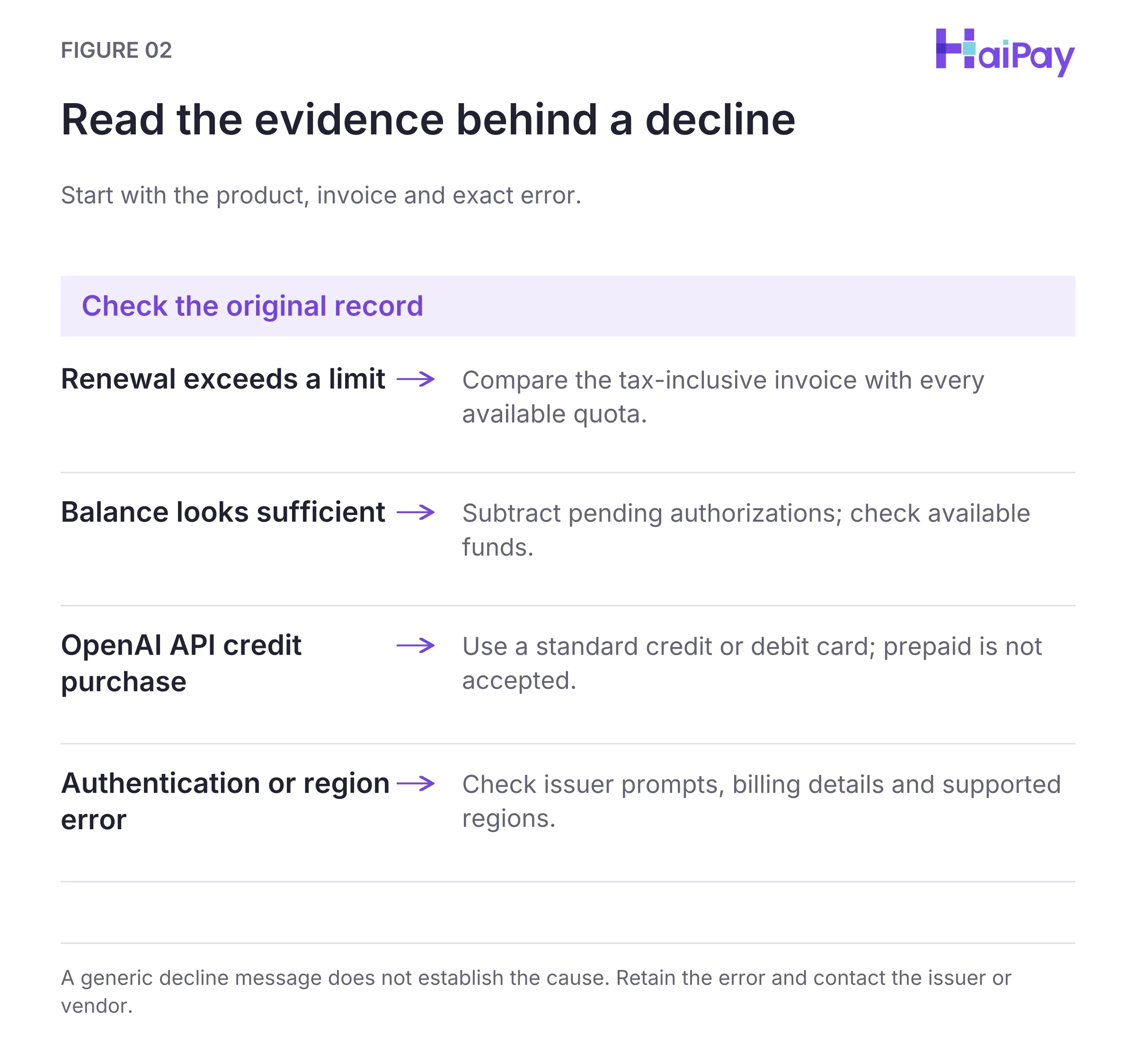
Figure 2: Read the evidence behind a decline. A generic decline message does not establish the cause. Retain the error and contact the issuer or vendor. Open full-size diagram
Product scope: HaiPay product-team confirmation supplied to the editorial team on October 30, 2026 covers prepaid funding, dashboard limits, pending authorizations, and card retirement. These details do not establish equivalent API operations or guarantee acceptance by any software vendor.
Setting Up Virtual Cards for Eligible AI Subscriptions
To govern AI tool spending without slowing down engineering teams, structure your workflow around four rules:
- Separate Web Seat Cards from API Credit Instruments: Issue dedicated Visa or Mastercard prepaid virtual cards for eligible web subscriptions, and record each card's platform Card ID (
卡ID) and alias in your ledger. Use a supported standard corporate credit or debit card for OpenAI API credit organizations that reject prepaidBINranges. - Size Card Limits from Verified Tax Invoices: Follow the arithmetic in software subscription payment controls. Verify the vendor's checkout tax or prior tax invoice before setting per-transaction, daily, and monthly limits, and require finance approval before raising limits for high-tier seats.
- Purchase Prepaid API Credits in Measured Increments: OpenAI prepaid API credits expire after one year and are generally non-refundable, with legal, contractual, and approved exceptions described in the billing policy. Buy credits in measured increments rather than oversized blocks, and enable hard project spend limits (
Enforce a hard limit). - Retire Cards Cleanly During Employee Exit: When an engineer leaves or an AI pilot concludes, freeze all cards assigned to that employee or project first. Confirm that pending transactions have settled and resolve any refund questions with HaiPay, return the available card balance to the HaiPay platform balance, and close the old cards. If the seat continues under a colleague, issue a new card for the new owner instead of transferring the old card.
To see how virtual cards fit alongside cloud infrastructure and broader SaaS tools, review virtual cards for software payments and virtual cards for cloud services. Teams can also explore HaiPay's card issuing platform or read our card issuing guide to configure four-tier card limits for eligible AI subscriptions.
Editorial & Financial Disclosure: HaiPay publishes this operational guide for general informational purposes. It does not constitute financial, legal, accounting, or tax advice. Vendor billing policies and card-network rules can change; always verify current terms in each provider's official billing documentation.
Source: Product-team confirmation, October 30, 2026; dashboard scope, not an API contract.
Sources
- OpenAI Help Center — Why was my credit card declined? (Accessed November 1, 2026)
- OpenAI Help Center — Managing billing for ChatGPT and the API platform (Accessed November 1, 2026)
- OpenAI Help Center — Setting up and managing prepaid API billing (Accessed November 1, 2026)
- OpenAI API Documentation — Spend limits (Accessed November 1, 2026)
- Anthropic Support — Use Claude Code with your Pro or Max plan (Accessed November 1, 2026)
- Anthropic Support — How do I pay for my Claude API usage? (Accessed November 1, 2026)
- Visa — Numerics Initiative (Accessed November 1, 2026)
- Claude Support — Managing API key environment variables (Accessed November 1, 2026)
FAQ
No. OpenAI's official payment documentation explicitly states that prepaid cards cannot be used to purchase API credits and that only standard credit or debit cards are supported on the API platform.
Source: OpenAI Help Center — Why was my credit card declined?, accessed November 1, 2026.
No. OpenAI manages ChatGPT web subscriptions and the API platform on separate billing systems. API credits are linked to an API organization at platform.openai.com and remain separate from ChatGPT workspace billing.
Source: OpenAI Help Center — Managing billing for ChatGPT and the API platform, accessed November 1, 2026.
Tax may be one cause; the error alone does not establish it. Check the invoice and available balance. In an illustrative USD 20.00 base plus USD 2.00 tax example, the USD 22.00 charge exceeds a USD 20.00 single-charge cap.
Method: Editorial recommendation and illustrative arithmetic in this guide; not a customer dataset or vendor price quotation. Source: HaiPay product-team confirmation supplied to the editorial team, October 30, 2026. Scope: dashboard controls, not equivalent API operations.
According to Anthropic Support, if an ANTHROPIC_API_KEY environment variable is present in your terminal session or shell profile (~/.zshrc or ~/.bashrc), Claude Code authenticates with that API key instead of your subscription. Run /status inside Claude Code to verify authentication, remove the environment variable, and run /logout followed by /login.
Source: Claude Support — Managing API key environment variables in Claude Code, accessed November 1, 2026.
A prepaid monthly recharge limit only restricts automatic credit top-ups (Use auto-reload), not manual purchases or spending of existing credits. In the OpenAI API console, spend alerts notify administrators at a threshold, whereas Enforce a hard limit blocks subsequent API requests with HTTP 429 (organization_spend_limit_exceeded or project_spend_limit_exceeded) after a brief propagation delay.
Sources: OpenAI prepaid billing for recharge limits, and OpenAI spend limits for alerts, hard limits, and enforcement delay; accessed November 1, 2026.
Disable browser pop-up blockers, ad blockers, and VPNs, or retry in an incognito browser window so the issuing bank's 3D Secure / Strong Customer Authentication OTP prompt can load and complete without refreshing checkout.
Source: OpenAI Help Center — Why was my credit card declined?, accessed November 1, 2026.

Related HaiPay surfaces
Explore the payment stack
Guide
Virtual cards for software payments
Build an eight-field software payment readiness ledger across AI, cloud, and SaaS tools.
Guide
Software subscription payment controls
Size per-transaction, daily, monthly, and cumulative card limits and manage offboarding.
Product
HaiPay virtual card issuing
Issue Visa and Mastercard prepaid virtual cards for eligible recurring business subscriptions.
Blog
Credit card decline codes
Diagnose issuer rejection codes, limit blocks, and 3D Secure verification failures.

Need help mapping your payment stack?
Talk to HaiPay about acquiring, orchestration, local methods, and payout workflows.
Contact us