
Direct Answer
Combine card spending limits with renewal reviews and a clear process for retiring cards. The HaiPay dashboard supports per-transaction, daily, monthly, and cumulative limits. At offboarding, freeze assigned cards, settle pending transactions, return available funds to the platform balance, then close them. Issue new cards for new owners.
Why Initial Approval Can Miss Later Renewals
Software as a service (SaaS) subscriptions need renewal reviews. If a purchase review covers only the initial invoice, later renewals or seat additions may escape that review. When a buyer enters a payment card at checkout, that initial payment runs as a Cardholder-Initiated Transaction (CIT), which may trigger interactive 3-D Secure (3DS) authentication depending on the issuer, merchant, and region.
Subsequent recurring renewals typically run as Merchant-Initiated Transactions (MIT, automated pulls against stored Card-on-File credentials without the buyer in session). This guide explains how four virtual card limit dimensions interact with pending authorizations, provides illustrative limit-sizing arithmetic, and details the four-step card retirement workflow for employee offboarding.
Review recurring payment processing and Card-on-File agreements when checking renewal charges. A stored card can support subsequent charges under the customer agreement. Recurring merchant-initiated transactions may occur without an interactive 3DS challenge. A token alone does not guarantee that an upgrade or new purchase avoids authentication.
Conversely, some debit cards require in-session two-factor authentication (2FA, such as a manual SMS one-time password on every charge). Google Cloud Billing explicitly rejects debit cards that require two-factor authentication. This is a Google Cloud payment-method rule, not a universal test for every subscription provider. Use card limits and scheduled ledger reviews alongside the vendor's subscription controls.
Source: Adyen — Issuing 3D Secure, Google Cloud Billing Documentation — Add, remove, or update a payment method, accessed November 1, 2026.
How the Four Virtual Card Limit Types Work Together
Here, virtual card (VCC) refers to a digitally issued card number; prepaid describes its funding arrangement. In HaiPay's virtual card issuing program, each card is a Visa or Mastercard prepaid virtual card backed by a preloaded balance and governed by four independent limit dimensions. For US funding and policy design, see our corporate card program guide.
Crucially, the per-transaction limit acts as a single-charge threshold evaluated on each authorization request, while authorized but unsettled (pending) transactions immediately occupy both the card's available balance and its daily, monthly, and cumulative spend quotas:
- Per-Transaction Limit: Sets the maximum dollar amount permitted for any single authorization request (evaluated per charge rather than as a depleting quota). Suppose a card is sized for a monthly seat with a
USD 25.00per-transaction cap in an illustrative setup. If a user attempts an unapprovedUSD 200.00plan upgrade, the per-transaction filter blocks the charge immediately. - Daily Limit: Caps the combined sum of all approved authorizations within a single calendar day (a daily spend quota) and resets on a next-day basis. If a merchant billing system enters a retry loop or an administrator triggers multiple manual top-ups on the same day, the daily cap halts additional authorizations once reached.
- Monthly Limit: Caps total approved authorizations across a calendar month (a monthly spend quota), preventing mid-month seat additions from exceeding the approved workspace budget.
- Cumulative (All-Time) Limit: Tracks actual transaction amounts, including pending authorizations, across cycles. It does not add up the monthly limit ceilings. Check available capacity in the dashboard; the internal transition from pending hold to settlement is not specified here. Once cumulative authorized spend reaches this dollar ceiling, subsequent charges are blocked unless finance raises the cap.
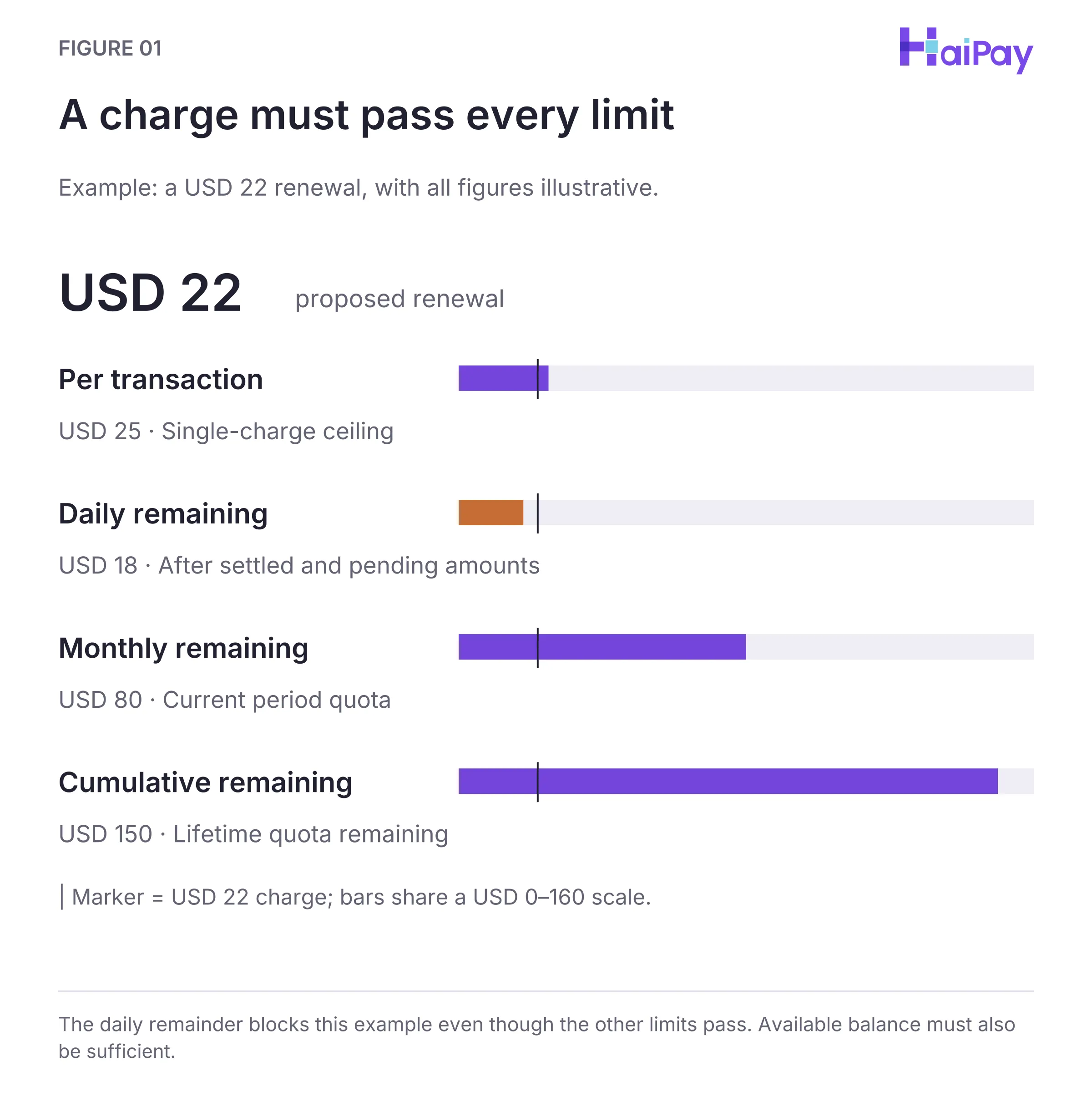
Figure 1: A charge must pass every limit. The daily remainder blocks this example even though the other limits pass. Available balance must also be sufficient. Open full-size diagram
Source: Product-team confirmation to the editorial team, October 30, 2026; dashboard scope. The exact reset timezone remains unconfirmed.
Verifying Tax-Inclusive Invoices and Next-Day Reset Windows
Two operational rules help administrators avoid false declines when configuring card limits:
- Verify Tax on the Vendor Invoice Rather Than Guessing a Flat Buffer: Software list prices may exclude tax. Actual checkout totals vary by the paying legal entity's jurisdiction, tax-exemption status, and billing currency. Instead of applying an arbitrary percentage across every region, inspect the vendor's checkout tax line or most recent tax invoice first, then add a modest cushion above that verified tax-inclusive total.
- Account for Next-Day Reset Timing (
Reset Timezone Unconfirmed): Daily limits reset on a next-day basis, and the exact system timezone used for the daily reset is currently unconfirmed. If a merchant bills in US Pacific Time while the card system resets in another timezone, two charges on adjacent local calendar days can fall inside the same daily limit cycle. Check the original transaction status before retrying. Then check available balance and all remaining quotas. A new local date or a higher daily limit does not guarantee approval.
Illustrative Limit Configuration Examples by Billing Cadence
The two three-column tables below demonstrate how to size all four limit dimensions for your virtual cards for software payments readiness ledger. All dollar amounts below are illustrative examples for arithmetic demonstration, not customer transaction records.
Table 1A: Illustrative Per-Transaction, Daily, and Monthly Limit Sizing
Illustrative SaaS Scenario (Not a Customer Transaction) | Assumed Base & Tax-Inclusive Invoice | Illustrative Per-Tx, Daily & Monthly Caps |
|---|---|---|
1. Single Monthly Seat (e.g.,
|
| Per-Tx: over
base) Daily / Monthly:
charge fits; this is not a retry allowance) |
2. 10-Seat Team Workspace (Monthly recurring team plan) |
assumed tax =
| Per-Tx: ( Daily / Monthly:
remains after the initial invoice; any extra charge must fit every limit) |
3. Annual Upfront Contract (Billed once per 12-month term) |
annually | Per-Tx: ( Daily / Monthly:
|
4. 30-Day Paid Pilot (Converts to not canceled) |
pilot + assumed tax = pilot total | Per-Tx: over Daily / Monthly:
|
Table 1B: Illustrative Cumulative Limit Math and Control Objectives
Illustrative SaaS Scenario (Not a Customer Transaction) | Illustrative Cumulative (All-Time) Cap | Arithmetic & Operational Control Objective |
|---|---|---|
1. Single Monthly Seat ( monthly charge) |
( billed total) | Cumulative limits track actual charged dollars, not monthly cap. After 12 charges of ( cap would still allow Month 13 ( Setting the card at 12 actual invoices of |
2. 10-Seat Team Workspace ( monthly charge) |
( tax-inclusive + approved seat buffer) | Sets a cumulative dollar ceiling. Pair it with a calendar review; the cap does not expire after 12 months. |
3. Annual Upfront Contract ( invoice) |
(Locked to Year 1 invoice ceiling) | Once the Year 1 invoice is authorized, remaining cumulative capacity ( to a auto-renewal without finance raising the cap. |
4. 30-Day Paid Pilot ( charge) |
(Hard pilot lifetime ceiling) | Blocks the post-trial conversion authorization at the card layer; the owner must still cancel the trial in the vendor portal. |
Method: Tables 1A and 1B use hypothetical amounts to show limit arithmetic, not customer transactions or vendor price quotations. Approval also requires sufficient available balance and remaining capacity in every applicable quota.
If one USD 22.00 authorization remains pending, a second would bring combined occupancy to USD 44.00. A USD 25.00 monthly quota would still block it even with a USD 50.00 daily cap. Confirm whether the first attempt failed, was reversed, or remains pending before changing limits.
For developer application programming interface (API) wallets, combine card limits with platform controls. Review OpenAI hard spend limits in AI subscription and API payments.
Calendar Renewal Audits and Owner Accountability
Card limits act as a financial circuit breaker at authorization, but blocking a card charge does not cancel a binding commercial contract with a software vendor. Furthermore, because a cumulative limit is a dollar ceiling rather than a calendar timer, any change in tax rate, currency conversion, or seat count changes when the cumulative ceiling is reached.
Finance teams should therefore pair four-tier card limits with a calendar-driven renewal audit workflow:
- Record a Named Internal Owner and Platform Card ID (
卡ID): Every card in the readiness ledger must list the issuing platform's unique Card ID (卡ID), card alias, current employee owner, and manager backup. - Schedule Calendar Reminders 30 Days Before Notice Deadlines: Track every subscription's renewal date and contract notice deadline on a shared finance calendar. Thirty days before the notice window closes, the internal owner must review active seats and submit any downgrade or cancellation directly inside the vendor's billing portal.
- Check Open Invoices Before Replacing Cloud or SaaS Cards: On platforms like AWS, adding or updating a credit card charges any unpaid invoices from the previous month to the newly bound card. Always reconcile open balances before updating a payment method.
Source: AWS Billing and Cost Management Documentation — Managing credit cards, accessed November 1, 2026.
The 4-Step Card Offboarding Workflow: Freeze, Settle, Return Balance, and Close
When an employee leaves the company or a software project concludes, using a new card helps keep the next owner's spending separate. Equally important, immediately closing a card while authorized charges or refund requests are still in flight can complicate settlement tracking.
Use the HaiPay dashboard for this confirmed four-step retirement workflow. API integration must be checked separately for each operation; the card issuing API guide explains that boundary.
Product scope: HaiPay product-team confirmation supplied to the editorial team on October 30, 2026 covers prepaid funding, dashboard limits, pending authorizations, and card retirement. These details do not establish equivalent API operations or guarantee acceptance by any software vendor.
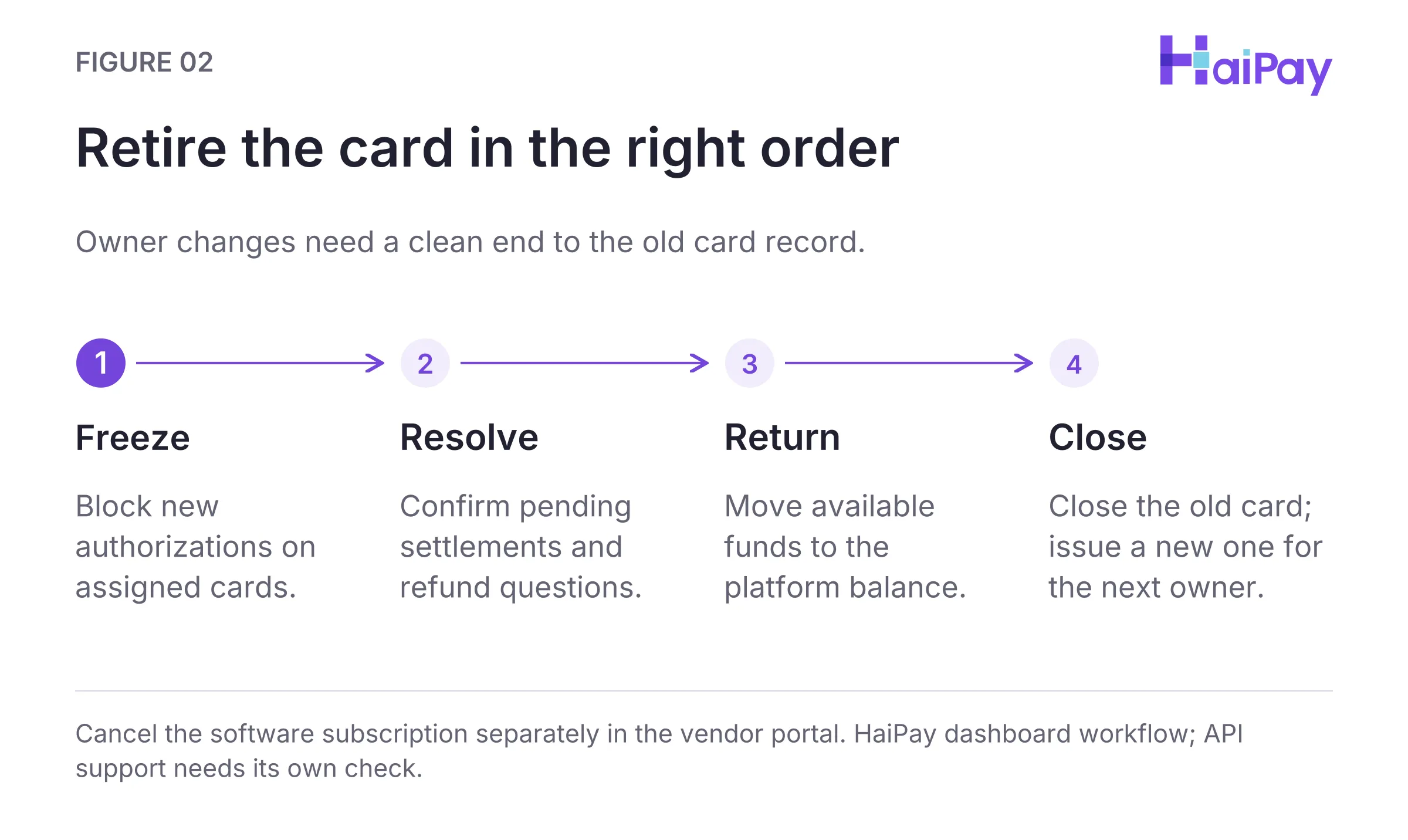
Figure 2: Retire the card in the right order. Cancel the software subscription separately in the vendor portal. HaiPay dashboard workflow; API support needs its own check. Open full-size diagram
- Step 1 — Freeze All Cards Assigned to the Departing Employee or Completed Project: Switch all virtual cards assigned to the exiting employee or finished project to Frozen immediately. Freezing blocks new authorization attempts at the card layer. If the underlying software subscription is also being terminated, cancel the subscription inside the merchant's billing portal so the vendor stops attempting renewals.
- Step 2 — Confirm Pending Settlements and Resolve Refunds: Pending authorizations immediately occupy available card balance and applicable spend quotas. Verify in the platform ledger that all legitimate in-flight transactions have settled, and resolve any outstanding refund questions with support. Closure timing depends on the actual transaction status rather than a fixed number of days.
- Step 3 — Return Available Balance to the Platform Balance: Once pending settlements and refund questions are resolved, return the remaining available card balance to the platform balance.
- Step 4 — Close the Old Cards and Issue New Cards for the New Owner: Permanently close the departing employee's old cards. Never unfreeze or transfer an old card to a new employee. When a continuing software tool transitions to a new internal owner, issue a brand-new virtual card for the new owner. Record the new platform Card ID (
卡ID) and alias in the readiness ledger, and update the vendor's billing portal.
Card Lifecycle State or Action | New Authorizations & Balance Status | Operational Governance Rule |
|---|---|---|
Active (With 4 Limits) | Each charge is checked against the per-tx threshold, available balance, and daily, monthly, and cumulative spend quotas; pending authorizations immediately occupy available balance and spend quotas. | Normal operating state for approved software subscriptions with a verified internal owner. |
Freeze / Unfreeze Card | Frozen blocks all new authorization requests while retaining balance for pending settlement review. Unfreeze restores charging privileges. | Freeze immediately upon employee exit, project completion, or billing dispute. Use Unfreeze only when the same owner and active project resume after a temporary pause—never to hand an old card to a new owner. |
Return Card Balance | Transfers remaining available card funds back to the platform balance. | Execute after confirming all pending transactions have settled and before closing the card. |
Close Card & Issue New Card | Closes the old card. | Close the departing owner's old card once balance is zero, and issue a new virtual card for any new subscription owner. |
To integrate these four limit dimensions and card retirement rules into your wider payment architecture, review virtual cards for software payments and virtual cards for cloud services. Organizations can also explore HaiPay's card issuing platform to manage Visa and Mastercard prepaid virtual cards with four-tier limits, freeze controls, balance return, and card closure workflows.
Editorial & Financial Disclosure: HaiPay publishes this operational guide for general informational purposes. It does not constitute financial, legal, accounting, or tax advice. Vendor billing policies and card-network rules can change; always verify current terms in each provider's official billing documentation.
Source: Product-team confirmation, October 30, 2026; dashboard scope, not an API contract.
Sources
- Google Cloud Billing Documentation — Add, remove, or update a payment method (Accessed November 1, 2026)
- AWS Billing and Cost Management Documentation — Managing credit cards (Accessed November 1, 2026)
- Adyen — Issuing 3D Secure (Accessed November 1, 2026)
FAQ
They may be used where the vendor accepts the card and recurring payment arrangement. Keep the card active, funded, and within all limits. Google Cloud specifically excludes debit cards requiring two-factor authentication; do not turn that provider rule into a universal acceptance test.
Sources: Google Cloud payment methods for its specific exclusion; Adyen issuing 3D Secure for recurring merchant-initiated transaction scope. Accessed November 1, 2026.
The per-transaction cap checks each charge. Daily and monthly quotas limit approved amounts within their respective cycles; cumulative capacity spans cycles. Pending authorizations occupy available balance and applicable quotas. Daily capacity resets the next day and monthly capacity at the start of the next month; confirm the system timezone.
Source: Product-team confirmation supplied to the editorial team, October 30, 2026. Scope: dashboard controls, not equivalent API operations.
Freezing blocks new authorizations while you review pending transactions. After settlement and any refund questions are resolved, return available funds to the platform balance and close the old card. Use a new card for the next owner.
Source: Product-team confirmation supplied to the editorial team, October 30, 2026. Scope: dashboard controls, not equivalent API operations.
Pair a cumulative cap with a calendar reminder before the vendor's cancellation deadline. For example, twelve hypothetical USD 22.00 invoices total USD 264.00. A card cap controls charges, not contract cancellation. The owner must review and cancel or downgrade through the vendor.
Method: Editorial recommendation and illustrative arithmetic in this guide; not a customer dataset or vendor price quotation. Source: Product-team confirmation supplied to the editorial team, October 30, 2026. Scope: dashboard controls, not equivalent API operations.
A previous authorization may still occupy the daily quota. Local midnight may not match the card system's reset time, which remains unconfirmed. Check the original transaction status, available balance, and daily, monthly, and cumulative capacity. Increasing only the daily cap may not help.
Source: Product-team confirmation supplied to the editorial team, October 30, 2026. Scope: dashboard controls, not equivalent API operations. Method: illustrative retry analysis in this guide.
Freeze the card, confirm pending transactions have settled, and resolve refund questions with support. Then return available funds to the platform balance and close the old card.
Source: Product-team confirmation supplied to the editorial team, October 30, 2026. Scope: dashboard controls, not equivalent API operations.

Related HaiPay surfaces
Explore the payment stack
Guide
Virtual cards for software payments
Manage software, AI, and cloud payment workflows with an eight-field readiness ledger.
Guide
Recurring payment processing
Understand how merchants execute recurring billing and Merchant-Initiated Transactions.
Guide
Card issuing API
Review documented API operations and distinguish them from dashboard-only or unconfirmed controls.
Product
HaiPay virtual card issuing
Configure per-transaction, daily, monthly, and cumulative limits on Visa and Mastercard virtual cards.

Need help mapping your payment stack?
Talk to HaiPay about acquiring, orchestration, local methods, and payout workflows.
Contact us