
Direct Answer
Check the cloud provider, billing country, and account agreement before adding a virtual or prepaid card. Azure excludes prepaid and virtual cards; Google Cloud Postpay excludes prepaid cards. AWS excludes virtual credit cards and discourages prepaid cards because an exhausted balance can interrupt payments.
Check Provider Rules Before Choosing a Cloud Payment Card
Amazon Web Services (AWS), Google Cloud, and Azure publish different payment-method restrictions. Check those rules before adding a prepaid or virtual card. This guide compares provider, region, and billing-account conditions. It also shows how separating billing accounts can reduce the workloads affected by a payment failure.
Unlike fixed-seat software subscriptions that collect payment upfront, self-serve cloud infrastructure typically runs on postpay monthly cycles or spend-threshold billing. Under threshold billing, a cloud provider lets an organization consume compute, storage, and AI resources first. Collection and verification triggers differ by provider. For example, Azure can make a threshold authorization that is reversed without settlement; do not treat every threshold check as a collected payment.
Here, virtual card refers to a digitally issued card number; prepaid describes its funding arrangement. HaiPay programs covered here use Visa and Mastercard prepaid cards. A bank identification number (BIN) identifies an issuing institution; Visa uses six-digit and eight-digit BINs. BIN information alone does not establish acceptance by a cloud provider.
Source: Visa — Numerics Initiative, accessed November 1, 2026. HaiPay funding classification: product-team confirmation, October 30, 2026.
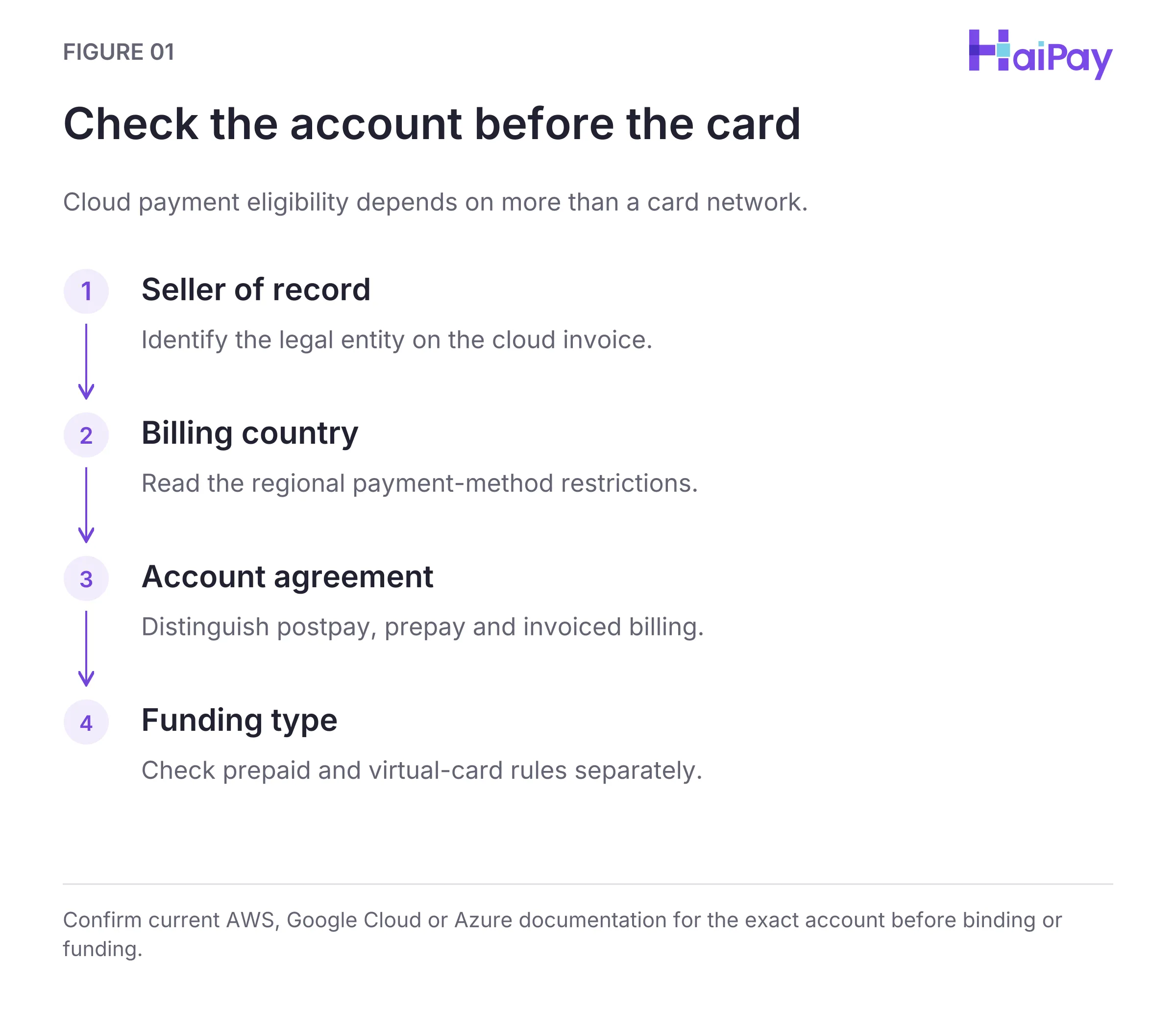
Figure 1: Check the account before the card. Confirm current AWS, Google Cloud or Azure documentation for the exact account before binding or funding. Open full-size diagram
Dated Cloud Payment Eligibility Matrix (AWS, Google Cloud, and Azure)
Before attaching a virtual credit card (VCC) or a prepaid virtual card to a cloud console, finance and development/operations (DevOps) teams should check the following account details. First, identify the cloud service and Seller of Record (SOR, the legal entity issuing the invoice). Second, verify the billing country, the account agreement type (Postpay, Prepay, or Invoiced), and the provider's official card-type exclusions.
To keep every rule easy to scan on both desktop and mobile screens, the verification matrix below is organized into two three-column tables: supported networks first, followed by official prepaid and virtual card exclusions.
Bank-payment abbreviations below are Automated Clearing House (ACH), Single Euro Payments Area (SEPA), and Bankers’ Automated Clearing Services (Bacs). Card names include American Express (Amex) and Japan Credit Bureau (JCB).
Table 1A: Supported Card Networks and Direct Debit by Cloud Provider
Cloud Provider & Account Scope | Seller of Record ( or Billing Agreement | Supported Cards & Bank Direct Debit (Checked Nov 1, 2026) |
|---|---|---|
Amazon Web Services ( | AWS Inc. (
Europe ( | AWS Inc.: Visa, MasterCard, Amex ( only), Discover, Diners Club, JCB, China UnionPay ( cards in qualifying US direct debit. AWS Europe: Visa, MasterCard, or Amex credit/debit cards, plus qualifying and UK debit. |
Google Cloud ( Google AI Studio | Self-Serve Online Cloud Billing ( Cloud Console vs.
Studio) | Visa, MasterCard, Amex, Visa/MasterCard debit cards, Discover ( only), JCB (
Electron (outside Qualifying bank accounts ( debit) require established billing history. |
Microsoft Azure | Microsoft Online Subscription Program ( Customer Agreement ( | Credit cards are accepted across supported regions, and debit cards are accepted in most regions (subject to regional rules in Hong Kong SAR, Brazil, and India). |
Table 1B: Official Prepaid & Virtual Card Policies and Regional Rules
Cloud Provider | Official Prepaid & Virtual Card Policy (Checked Nov 1, 2026) | Regional & Account-Level Constraints |
|---|---|---|
Amazon Web Services ( | VCC Rejected; Prepaid Discouraged: AWS explicitly states that Amazon.com gift cards, virtual credit cards ( not accepted. AWS accepts supported-network prepaid credit and debit cards but advises against them. An exhausted balance can cause failed payments and account suspension. | Regional differ: AWS Brazil (
cards only (Visa, MasterCard, Amex, Elo); AWS Turkey rejects Troy debit cards; AWS South Africa and AWS Indonesia accept Visa and MasterCard credit/debit cards. |
Google Cloud ( | Prepaid & 2FA Debit Rejected on Postpay: Google Cloud Billing docs explicitly state that prepaid cards are not accepted for payment, and debit cards requiring two-factor authentication ( are not accepted. Google's signup troubleshooting guide also notes that prepaid cards, virtual cards, and certain unverified business cards may not be accepted. | Every self-serve Cloud Billing account must keep at least one valid payment method on its linked Postpay Google payments account even when the monthly balance is Prepay billing is managed from the Billing page in Google AI Studio. |
Microsoft Azure | Prepaid and Virtual Cards Strictly Rejected: Microsoft Learn explicitly states that "Prepaid and virtual cards are not accepted as payment for Azure subscriptions." | Hong Kong SAR and Brazil support credit cards only. India supports Visa and Mastercard credit/debit cards (with an Azure-generated one-time password ( when adding the payment method), while Amex credit cards are not currently supported in India. |
Source: AWS re:Post Knowledge Center — Learn the accepted payment methods for AWS, Google Cloud Billing Documentation — Add, remove, or update a payment method, Google Cloud Support — Troubleshoot Google Cloud signup issues, and Microsoft Learn — Troubleshoot a declined card at Azure sign-up and Microsoft Learn — Manage Azure payment cards, accessed November 1, 2026.
Why Relying on Prepaid Balances for Postpay Cloud Creates Operational Risk
Even where a regional payment processor allows a prepaid card to pass an initial verification check, funding postpay cloud infrastructure from a fixed preloaded balance carries substantial operational risk. Cloud traffic spikes, autoscaling events, or threshold billing pulls can occur at any hour. If a threshold charge exceeds the remaining balance on a prepaid card, the authorization fails and places linked cloud workloads at risk of suspension.
Managing Postpay Thresholds, Unpaid Invoices, and Card Replacement Scope
Updating or replacing a payment card on a live cloud account does not work like swapping a card on a single-user SaaS tool. Each major cloud provider enforces specific invoice-collection and account-scope behaviors during card updates:
Cloud Provider | What Happens When You Add, Update, or Replace a Card | How to Reduce Interruption Risk & Scope Overrides |
|---|---|---|
AWS | Collection of Prior-Month Unpaid Invoices: AWS Billing documentation notes that when you add or update a credit card, AWS charges any unpaid invoices from the previous month to the newly updated card. If your organization receives invoices from multiple AWS Sellers of Record ( use payment profiles to assign a payment method to each billing-transfer arrangement before changing preferences. | Check for open or past-due invoices in the AWS Billing and Cost Management console before binding a replacement card, and ensure the card's limit covers both prior unpaid invoices and temporary verification holds. |
Google Cloud | Suspension Affects Linked Projects: A suspended Cloud Billing account stops APIs, services, and resources in all linked projects. This includes services paid with Prepay credits. Keep the linked Postpay payment method valid. | Configure a secondary corporate credit or debit card as a Backup payment method on the Google payments account (bank accounts cannot serve as a backup payment method). Before removing a primary method, select another valid method as Primary. This may be an existing method or an eligible bank account; bank accounts cannot be Backup methods. |
Microsoft Azure | MOSP Shared Card vs. MCA Billing Profiles: Under the Microsoft Online Subscription Program ( methods are associated with individual subscriptions. Replacing a method shared by multiple subscriptions updates the subscriptions using that method. Under a Microsoft Customer Agreement ( payment methods are set at the billing profile level (review the profile's assigned payment method before adding subscriptions). Microsoft also allows a different card when creating a new subscription. Its FAQ warns that Set active or Replace payment can change payment assignments across subscriptions; check the affected scope before confirming. | Verify whether your Azure tenant uses or
when departmental subscriptions need distinct corporate credit cards, and avoid clicking
shared profile. |
Source: AWS Billing and Cost Management — Managing credit cards, AWS Billing and Cost Management — Customizing your AWS payment preferences, Google Cloud Billing — Add, remove, or update a payment method, and Microsoft Learn — Add, update, or delete a credit card for Azure, accessed November 1, 2026.
Isolating Cloud Billing Accounts and Configuring Backup Payment Methods
To limit the blast radius of a payment decline or runaway sandbox experiment, cloud architects and finance leaders should structure billing across three defensive practices:
- Separate Production Billing Accounts from Sandbox and Experimental Projects: Do not attach experimental sandboxes or marketplace trials to the same Google Cloud Billing account, AWS payer account, or Azure billing profile as production workloads. As Google Cloud's documentation warns, suspension of a Cloud Billing account stops resources across its linked projects, including services funded with Prepay credits. Separate billing accounts can reduce this shared failure risk. Check whether payment methods or parent-account arrangements still link those accounts.
- Configure a Backup Payment Card Where Supported: Check whether the platform provides a dedicated backup slot. Google Cloud Postpay payments accounts allow a second valid corporate credit or debit card as the Backup payment method. Provided the backup card remains valid and funded, it reduces the risk that a primary card expiration or velocity block causes a billing interruption. On AWS, use per-
SORpayment profiles to organize payment methods across regions. - Evaluate Bank Direct Debit or Invoiced Billing for Mature Workloads: Availability depends on provider, country, account eligibility, and agreement. AWS documents US bank payments (
ACH), European direct debit (SEPA), and UK direct debit (Bacs) for eligible accounts. Check current account-specific collection terms; do not assume a universal notice period. Moving matureIaaS(Infrastructure as a Service) accounts to direct debit removes card expiration dates from the renewal path, provided bank balances and direct-debit mandates remain active.
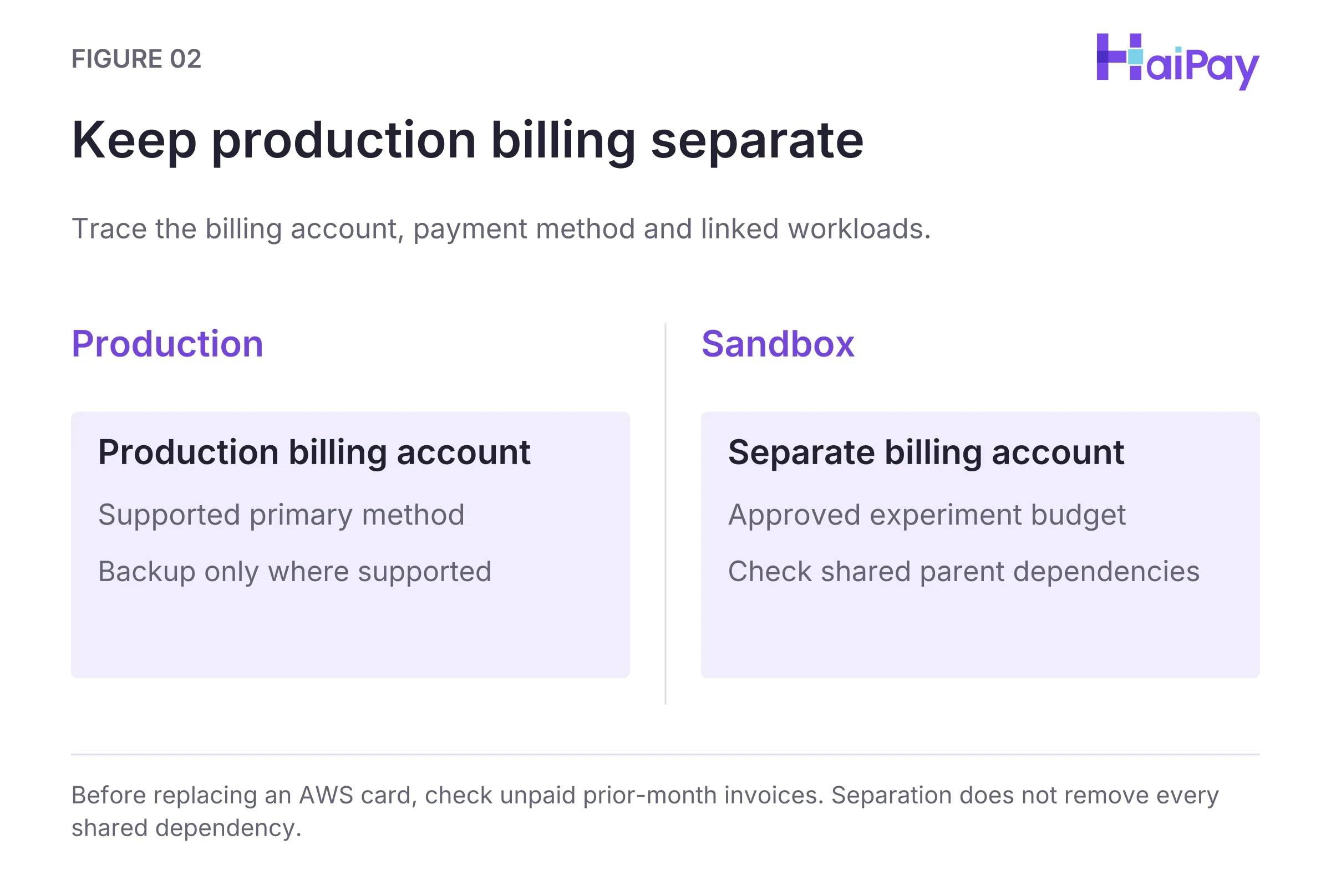
Figure 2: Keep production billing separate. Before replacing an AWS card, check unpaid prior-month invoices. Separation does not remove every shared dependency. Open full-size diagram
Source: AWS re:Post — Accepted payment methods and Google Cloud Billing — Add, remove, or update a payment method, accessed November 1, 2026.
Where Virtual Cards Fit in a Hybrid Cloud and DevOps Stack
Microsoft Azure rejects prepaid and virtual cards, Google Cloud Postpay rejects prepaid cards, and AWS rejects virtual credit cards (VCC) while advising against prepaid cards. Because of these official policies, finance teams should draw a clear boundary between core cloud infrastructure and surrounding software tools:
- Keep Hyperscale IaaS on Standard Corporate Credit Cards or Direct Debit: Choose a payment method explicitly supported for the provider and region. AWS and Google Cloud offer bank-payment options for eligible accounts; do not assume those options also apply to Azure. Use the same standard corporate credit or debit cards for OpenAI API prepaid credit organizations.
- Deploy Prepaid Virtual Cards on Eligible Peripheral DevOps, Observability, and SaaS Tools: A cloud stack may also include separately billed software as a service (SaaS) tools. These include code repositories,
CI/CD(Continuous Integration and Continuous Delivery) pipelines, monitoring dashboards, collaboration workspaces, and eligible AI web seat subscriptions. Issuing dedicated Visa or Mastercard prepaid virtual cards for these eligible SaaS subscriptions gives finance teams per-transaction, daily, monthly, and cumulative spend limits while keeping those SaaS payment instruments separate from core cloud billing. - Retire Cards Cleanly When Cloud Projects or Engineers Rotate: Track every cloud payment instrument and peripheral SaaS virtual card in the eight-field readiness ledger from virtual cards for software payments. Key each entry by its platform Card ID (
卡ID) and card alias. When an engineer leaves or a project ends, freeze the assigned SaaS virtual cards and confirm pending transactions have settled. Then return the available card balance to the HaiPay platform balance, close the old cards, and issue new cards for any new owner.
Source: OpenAI — Card payment policy for API credit purchases, accessed November 1, 2026. SaaS card controls and retirement: HaiPay product-team confirmation, October 30, 2026.
When evaluating card issuing platforms for your broader software stack, review AI subscription and API payments, software subscription payment controls, and credit card decline codes. To issue Visa and Mastercard prepaid virtual cards with four-tier limits for eligible SaaS and developer subscriptions, explore HaiPay's virtual card issuing solution.
Editorial & Financial Disclosure: HaiPay publishes this operational guide for general informational purposes. It does not constitute financial, legal, accounting, or tax advice. Vendor billing policies and card-network rules can change; always verify current terms in each provider's official billing documentation.
Product scope: HaiPay product-team confirmation supplied to the editorial team on October 30, 2026 covers prepaid funding, dashboard limits, pending authorizations, and card retirement. These details do not establish equivalent API operations or guarantee acceptance by any software vendor.
Sources
- AWS re:Post Knowledge Center — Learn the accepted payment methods for AWS (Accessed November 1, 2026)
- AWS Billing and Cost Management Documentation — Managing credit cards (Accessed November 1, 2026)
- AWS Billing and Cost Management Documentation — Customizing your AWS payment preferences (Accessed November 1, 2026)
- Google Cloud Billing Documentation — Add, remove, or update a payment method (Accessed November 1, 2026)
- Google Cloud Support Documentation — Troubleshoot Google Cloud signup issues (Accessed November 1, 2026)
- Microsoft Learn — Troubleshoot a declined card at Azure sign-up (Accessed November 1, 2026)
- Microsoft Learn — Add, update, or delete a credit card for Azure (Accessed November 1, 2026)
- Visa — Numerics Initiative (Accessed November 1, 2026)
- OpenAI — Card payment policy (API credits; accessed November 1, 2026)
FAQ
AWS states that Amazon.com gift cards, virtual credit cards (VCC), and PayPal are not accepted payment methods. AWS accepts prepaid credit and debit cards from supported networks by Seller of Record, but advises against using them. An empty balance can cause failed payments and account suspension.
Source: AWS re:Post — Learn the accepted payment methods for AWS, accessed November 1, 2026.
No. Google Cloud Billing documentation explicitly lists prepaid cards and debit cards that require two-factor authentication as unsupported payment methods for self-serve Cloud Billing accounts.
Source: Google Cloud Billing — Add, remove, or update a payment method, accessed November 1, 2026.
No. Microsoft Learn's declined-card troubleshooting guide explicitly states that prepaid and virtual cards are not accepted as payment for Azure subscriptions.
Source: Microsoft Learn — Troubleshoot a declined card at Azure sign-up, accessed November 1, 2026.
Google Cloud requires every self-serve online Cloud Billing account to maintain at least one valid payment method on its linked Postpay payments account even if the balance due is $0.00. If the billing account is suspended, all APIs and resources stop across all linked projects, including services paid with Prepay credits.
Source: Google Cloud Billing — Add, remove, or update a payment method, accessed November 1, 2026.
AWS states that adding or updating a credit card causes collection of unpaid invoices from the previous month using the updated card. The documentation does not promise an exact processing time. Check unpaid invoices and card capacity before changing the method.
Source: AWS Billing and Cost Management — Managing credit cards, accessed November 1, 2026.
For MOSP, payment methods are associated with individual subscriptions. Replacing a method shared by multiple subscriptions updates those using it. For MCA, check the billing profile. Microsoft allows a separate card for a new subscription but warns that Set active or Replace payment can affect other subscriptions. Review the affected scope before confirming.
Source: Microsoft Learn — Add, update, or delete a credit card for Azure, accessed November 1, 2026.

Related HaiPay surfaces
Explore the payment stack
Guide
Virtual cards for software payments
Coordinate cloud, AI, and SaaS billing instruments inside an eight-field readiness ledger.
Guide
Card issuing platforms
Evaluate card issuing platforms, BIN types, regional support, and program controls.
Guide
Software subscription payment controls
Configure four virtual card limit types and manage card offboarding safely.
Product
HaiPay virtual card issuing
Issue Visa and Mastercard prepaid virtual cards for eligible DevOps and SaaS subscriptions.

Need help mapping your payment stack?
Talk to HaiPay about acquiring, orchestration, local methods, and payout workflows.
Contact us