


Direct Answer
Choose virtual cards for advertising by checking payment rules, card readiness, who investigates failures, and how charges match bills.
Choose virtual cards for advertising by checking payment rules, card readiness, who investigates failures, and how charges match bills.
Start with the advertising account's country, currency, payment setting, and permitted card type. Then assign a card owner and preserve the evidence from each payment attempt. If payment fails, separate the platform message from the card provider's records before deciding who investigates next. Reconcile spend by matching platform documents to card transactions to account for the money paid.
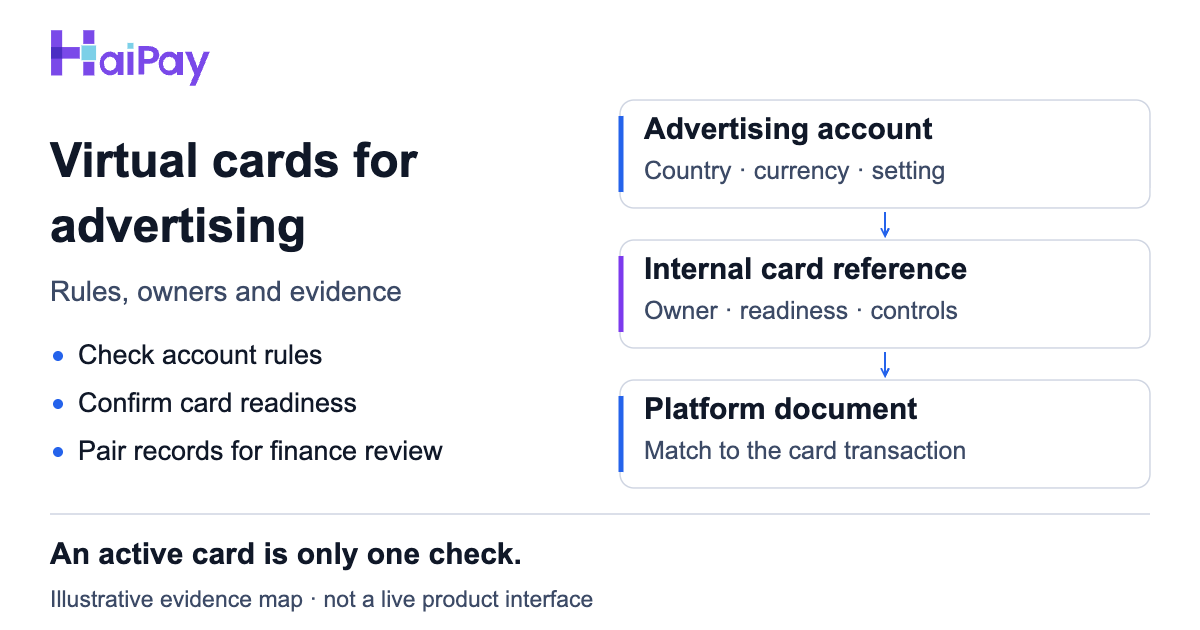
Map account, card and document references before investigating payments. Illustrative evidence map, not a live product interface.
This guide is for teams managing business advertising payments, with platform examples from Meta and Google Ads. For the broader definition and responsibilities, read the card issuing guide.
Start with eight records, not a supplier shortlist
Use the accompanying ad payment evidence worksheet. Complete the first five records before validation, your initial card setup or payment check. Add the remaining records when their event occurs.
Record | Who confirms it | Evidence to check |
|---|---|---|
Account and paying entity | Account owner and finance | Account reference and approved legal payer |
Billing owner and access | Account owner | Named administrator and current billing permissions |
Payment conditions | Billing administrator and card provider | Actual country, currency, setting, and official card-type rule |
Card reference and owner | Card administrator | Internal card reference mapped to the account |
Card readiness | Card administrator and finance | Status, expiry, available funds, temporarily reserved funds (holds), and spending controls |
Attempt result, after validation | Billing administrator and provider | Time, time zone, sanitized message, and corresponding provider record |
Next investigator, when payment fails | Advertising operations | Named owner, missing evidence, and case reference |
Document match, at reconciliation | Finance | Platform document paired with card transaction; unresolved differences assigned |
The full worksheet retains 35 detailed checks and a next-owner field. These are recommended records, not a promise that every platform or provider supplies every field.
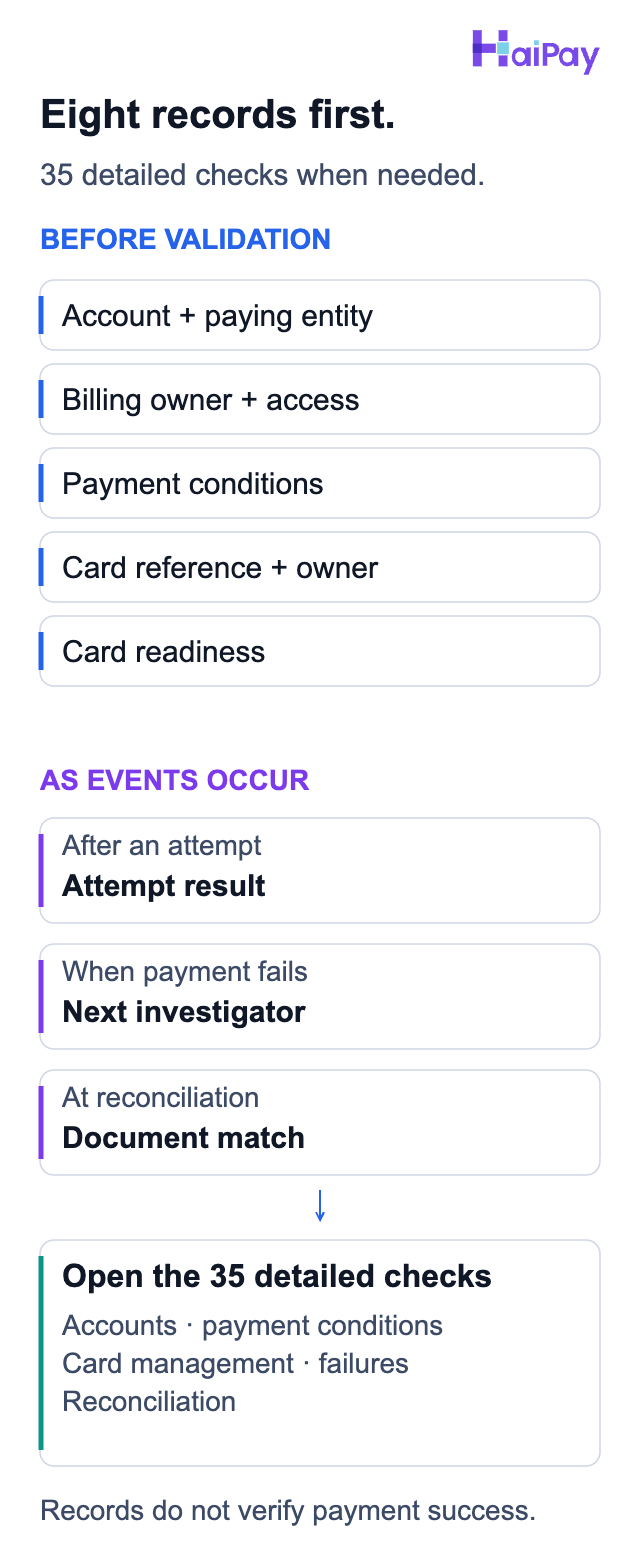
Start with the required entry records and open the relevant detailed checks. These records do not confirm payment success.
The companion tool runs in the browser with no upload or automatic saving. Closing or reloading clears entries. Use anonymous aliases in it. Keep the real account, card, and document mapping in your authorized systems. Never enter card numbers, card security codes, one-time passwords, or credentials. The tool records evidence presence; it does not verify payment success or diagnose a failure.
1. Check the account's payment conditions
Have the billing administrator record the actual settings and the applicable official help page. Ask the card provider to confirm the card's type and any online or recurring-payment restrictions. If a condition is unknown, resolve it before validation. If the platform excludes that card type, choose a supported method.
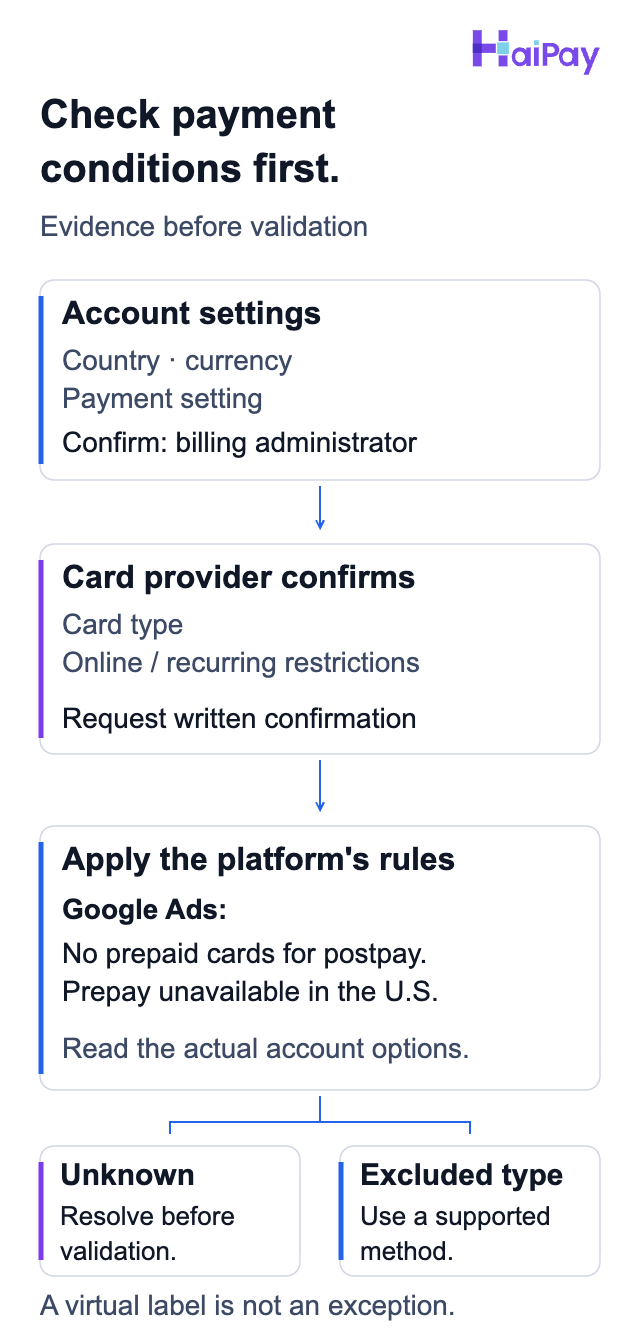
Resolve unknown conditions before validation. An excluded card type requires a supported payment method; a virtual-card label is not an exception.
Source: Google Ads Help, "Know your billing options" (Google payment settings, prepaid postpay exclusion and United States prepay restriction), accessed 2026-10-10.
Meta: country, currency, and the original setup matter
Meta's available payment methods depend on the account's country and currency. The method chosen when creating the first ad determines the payment setup. For cards, automatic payments depend on the bank supporting recurring payments. Some advertisers may have both automatic payments and available funds in one account.
Check the actual account rather than assuming that another client's setup applies. Meta's failure guidance also calls for online transactions to be enabled, accurate payment details, a valid expiry date, and sufficient funds.
Source: Meta, "Accepted payment options for Meta ads" and "Troubleshoot a failed payment on Meta" (account conditions and readiness; titles translated and content paraphrased from official Chinese help), accessed 2026-10-10.
Google Ads: preserve the card-type restriction
Google distinguishes the payment setting, when you pay, from the payment method, what you pay with. Postpay normally charges after ads run; prepay funds future ads. Available methods depend on the business-address country and account currency. Google's instructions for U.S., Canadian, and Brazilian accounts also note that normally available options may become temporarily unavailable.
Google does not accept prepaid cards for postpay payments. Its billing-options page lists the United States among countries where prepay is unavailable. A virtual-card label or a card-network logo does not establish an exception. Check the official options and the account's Billing settings; ask Google billing support about an unclear account setting.
Source: Google Ads Help, "Know your billing options" (payment settings, prepaid exclusion, country and account restrictions), accessed 2026-10-10.
2. Map the account to its payer and card owner
Create an ownership record before adding a payment method. Include the account, legal payer, invoice recipient, project, billing administrator, and card administrator. In your secured record, connect the internal card identifier and last four digits to the account.
A separate card reference per account can make ownership easier to trace. Treat this as a management choice, not a universal platform requirement. If you share a card across accounts, record every association and check the platform's sharing restrictions.
For agency handovers, name the person who can update billing and the person who can manage the card. Verify their current access before the outgoing operator leaves. A card list without billing access is an incomplete handover.
3. Record validation as separate events
Keep five observations separate: the platform's payment-method status, cardholder verification, the provider's approval or decline response (authorization), its transaction-state label, and ad-account delivery status. Record labels such as 'hold' or 'posted' as shown by your provider, and ask what each means. Ask whether funds are temporarily reserved or a charge appears in the transaction history. For each attempt, ask the provider for its approval decision. Keep the provider's hold and charge records separate.
3-D Secure (3DS) helps the card issuer, the institution issuing the card, verify that an online buyer is the legitimate cardholder. Meta requires it when adding cards in some countries. Persistent verification problems should go to the financial institution. Record the outcome without storing the code used. Record the authentication outcome and the provider's approval or decline as separate fields. Keep those results separate, and use the 3-D Secure explanation for more detail.
Source: EMVCo, "EMV 3-D Secure" (cardholder authentication); Meta, "Troubleshoot a failed payment on Meta" (country-limited verification and escalation; Meta title translated from official Chinese help), accessed 2026-10-10.
Google notes that a new or updated payment method may trigger a temporary authorization hold, rather than an actual fee. Record its status and ask the provider about its current state. Do not turn a general platform description into a promised release time for your card.
Source: Google Ads Help, "How to dispute a Google Ads charge" (temporary authorization holds), accessed 2026-10-10.
4. Send a failed payment to the right investigator
Preserve the exact sanitized error, attempt time and time zone, amount, currency, account reference, and card alias. Request the matching provider record. Use the observation to assign the next investigation, rather than guessing from the account balance alone.
Observation | Next owner | Evidence to request |
|---|---|---|
Actual issuer decline | Card provider or issuing institution | Matching attempt, response reason, card status, funds, and relevant controls |
Verification problem | Billing administrator and financial institution | Verification outcome and whether the institution received the attempt |
No matching provider record | Provider and platform billing support | Provider search scope and platform attempt details; cause remains unresolved |
Outstanding platform balance or paused ads | Platform billing administrator or support | Current balance, payment status, account limits, and delivery status |
Unrecognized charge or document mismatch | Finance and platform billing support | Platform activity, payment reference, and matching card transaction |
Suspected unauthorized use with an unrecognized Google Ads account | Bank or card company, with finance | Charge details, suspected compromise, and card cancellation or replacement |
Source: Google Ads Help, "Resolve a declined payment: Credit cards"; Google Ads Help, "How to dispute a Google Ads charge"; Meta, "Troubleshoot a failed payment on Meta" (decline ownership, verification/support routes, unrecognized-charge investigation and the conditional bank-dispute route; Meta title translated from official Chinese help), accessed 2026-10-10.
For an actual Google credit-card decline, its help page directs you to the bank or card company. Billing Summary supplies the date, amount, and reason if available. Google separately directs unrecognized-charge investigations to Billing Activity, its charge troubleshooter, and Google Ads support. These are different support responsibilities.
If you suspect unauthorized activity and do not recognize the Google Ads account, contact your bank or card company about disputing the charge. Google says this is often the recommended first step. A chargeback is a dispute through your bank or card company. Cancel or replace the compromised card to prevent further unauthorized transactions. Reversing a payment against a legitimate Google Ads balance may suspend the account.
Source: Google Ads Help, "Resolve a declined payment: Credit cards" and "How to dispute a Google Ads charge" (decline ownership, charge investigation, and suspected unauthorized activity), accessed 2026-10-10.
Check Meta's failure categories
Meta distinguishes issuer rejection, activation problems, verification problems, connection errors, and insufficient funds or payment-method limits. Its Business Support Home is the escalation route when its troubleshooting steps do not resolve payment failure. Ads may remain paused after payment because of a separate daily spending limit.
Source: Meta, "Troubleshoot a failed payment on Meta" (failure categories, support route, and post-payment spending-limit check; title translated from official Chinese help), accessed 2026-10-10.
Before another attempt, record the correction or support instruction and assign the person authorized to act. The worksheet does not initiate retries.
Synthetic example: the provider shows a pending hold while Meta ads remain paused. Ask the provider to clarify the transaction state and the billing administrator to inspect the platform balance and limits. Neither observation alone identifies the cause.
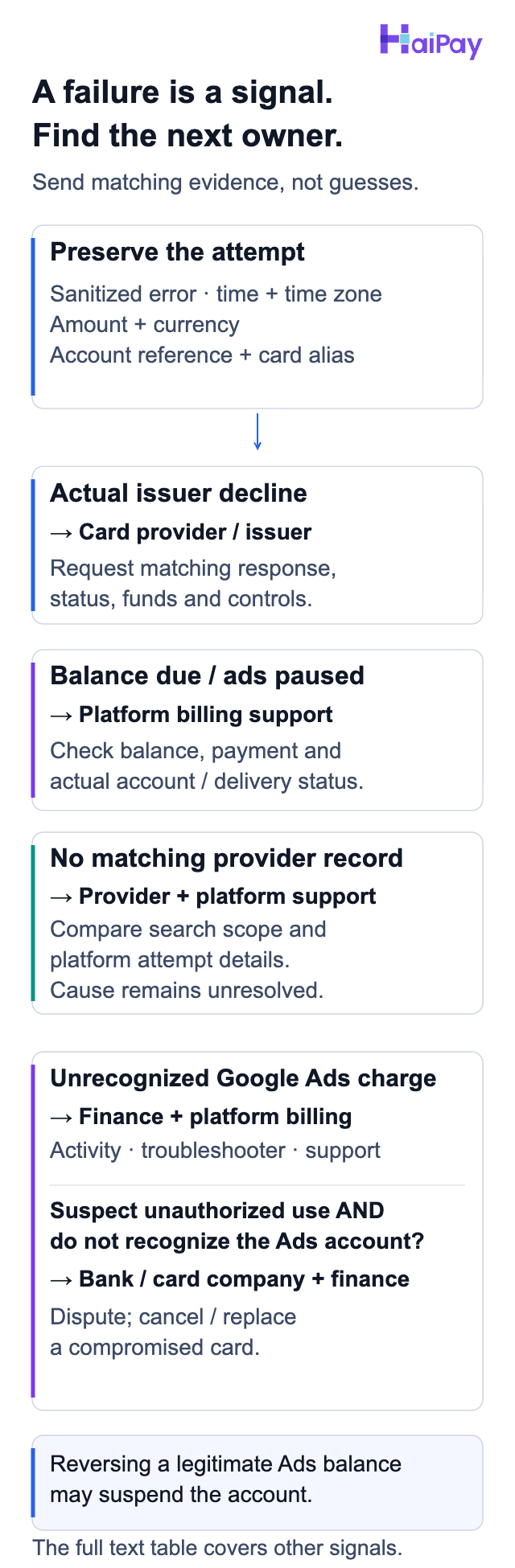
Use the observed evidence to name the next investigator. Reversing a legitimate Google Ads balance may suspend the account. This condensed map supplements the full text table.
Source: Google Ads Help, "Resolve a declined payment: Credit cards"; Google Ads Help, "How to dispute a Google Ads charge" (Google decline ownership, conditional unauthorized-activity dispute, compromised-card handling and legitimate-balance suspension risk), accessed 2026-10-10.
5. Reconcile platform documents with card transactions
Have finance pair the platform receipt, invoice, or payment reference with the provider transaction reference. Compare amounts and currencies, timestamps with time zones, transaction states, and the account-to-payer mapping.
Keep holds, posted charges, refunds, fees, and currency conversion in separate fields. If the provider marks a transaction 'reversed,' ask whether it was cancelled or refunded and how that appears in its records. Ask the provider for its definitions instead of assuming that similarly named states mean the same thing. Assign each difference a case owner and preserve both source records for review.
The worksheet's export is an anonymous handoff of selections and missing evidence. It omits typed observations and financial values. Keep your complete reconciliation evidence in authorized records; finance signs off there. A completed worksheet is not accounting approval.
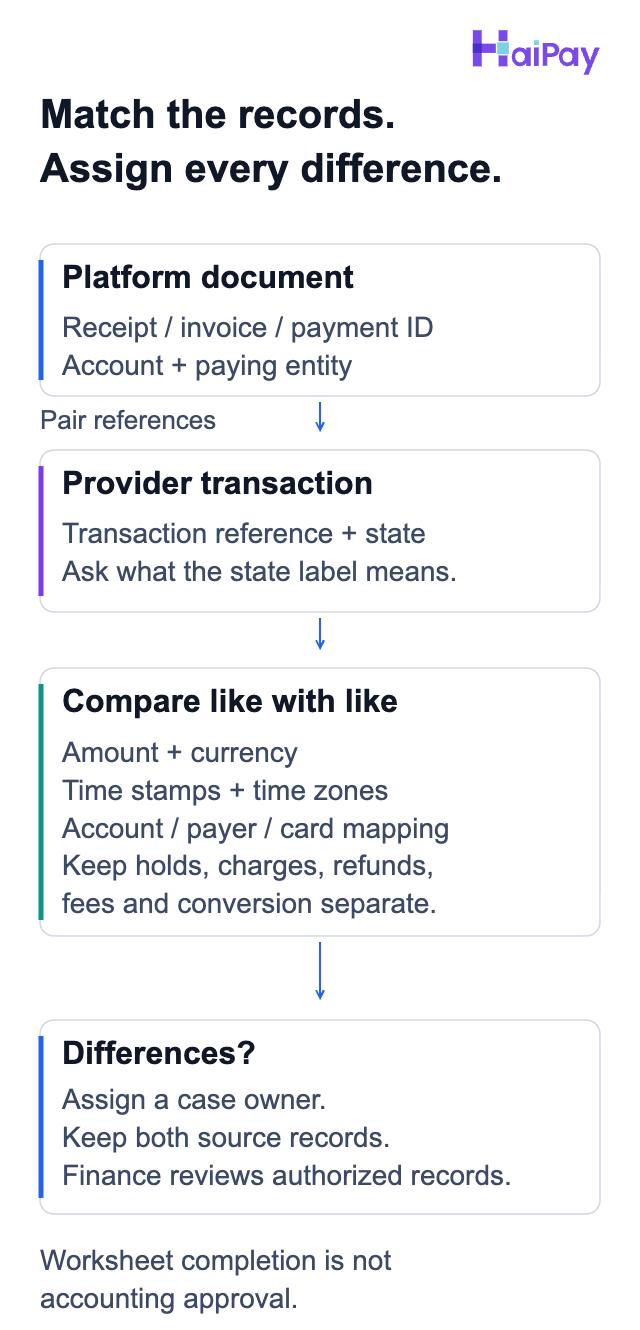
Preserve both source records and assign unresolved differences. Worksheet completion is not accounting approval.
Discuss card management after checking eligibility
HaiPay publishes this guide and offers enterprise virtual-card programs. Its United States and Singapore programs include Visa and Mastercard; the Hong Kong program includes Mastercard. The stated use includes advertising spend. Program locations are not a list of countries whose businesses can apply; entity and industry review still apply.
Its confirmed dashboard capabilities include per-card limits, freeze and unfreeze, card closure, failure alerts, transaction records, comma-separated values (CSV) exports, and tags.
Source: HaiPay, "Product owner confirmation" (program scope confirmed 2026-10-10; dashboard scope from existing project confirmation), accessed 2026-10-10. These are first-party statements, not independent payment tests.
Prepare the management inquiry
This is an operational guide, not investment advice.
Use the card issuing management options to discuss application requirements and those controls. Bring your entity country, proposed use, ownership model, and reporting needs. This management inquiry does not establish compatibility with any advertising platform or override its payment rules.
Sources
- Google Ads Help: Know your billing options. Payment-setting, country, currency, and prepaid restrictions. Accessed 2026-10-10.
- Meta: Accepted payment options for Meta ads. Account-specific methods and payment setup; official Chinese text paraphrased in English. Accessed 2026-10-10.
- Meta: Troubleshoot a failed payment on Meta. Readiness, verification, failure categories, and support. Official Chinese text paraphrased in English. Accessed 2026-10-10.
- Google Ads Help: Resolve a declined payment: Credit cards. Actual card declines and Billing Summary evidence. Accessed 2026-10-10.
- Google Ads Help: How to dispute a Google Ads charge. Holds, unrecognized charges, and suspected unauthorized activity. Accessed 2026-10-10.
- EMVCo: EMV 3-D Secure. Protocol purpose and cardholder authentication. Accessed 2026-10-10.
FAQ
Google does not accept prepaid cards for postpay, the setting that normally charges after ads run. Prepay funds future ads and is unavailable in the United States. Check the account's supported payment methods rather than treating a virtual-card label as an exception.
Sources: Know your billing options. Accessed 2026-10-10.
For an issuer decline, contact the card provider or issuing institution with the matching attempt details. For account conditions or outstanding balances, involve platform billing support. For an unrecognized Google Ads charge, check Billing Activity and the Unidentified Google Ads Charges Troubleshooter. Contact Google Ads support if further investigation is needed.
If you suspect unauthorized activity and do not recognize the Google Ads account linked to the charge, contact your bank or card company about a dispute. Google says this is often the recommended first step. Google calls that dispute a chargeback. Cancel or replace a compromised card. Reversing a payment against a legitimate Google Ads balance may suspend the account.
If no matching provider record exists, ask both parties to check the evidence before assigning a cause.
Sources: Resolve a declined payment: Credit cards; How to dispute a Google Ads charge; Troubleshoot a failed payment on Meta. Accessed 2026-10-10.
No. It records evidence and next owners. Platform rules, card conditions, provider transaction records, and finance review still need separate confirmation.
Have the billing administrator record the actual settings and the applicable official help page. Ask the card provider to confirm the card's type and any online or recurring-payment restrictions. If a condition is unknown, resolve it before validation. If the platform excludes that card type, choose a supported method.
Keep five observations separate: the platform's payment-method status, cardholder verification, the provider's approval or decline response (authorization), its transaction-state label, and ad-account delivery status. Record labels such as 'hold' or 'posted' as shown by your provider, and ask what each means.
Have finance pair the platform receipt, invoice, or payment reference with the provider transaction reference. Compare amounts and currencies, timestamps with time zones, transaction states, and the account-to-payer mapping.

Related HaiPay surfaces
Explore the payment stack
Guide
Card issuing roles
Understand the roles involved in a card program.
Product
HaiPay card issuing
Discuss product scope and your business requirements.
Glossary
3-D Secure
Read the explanation of cardholder authentication.

Need help mapping your payment stack?
Talk to HaiPay about acquiring, orchestration, local methods, and payout workflows.
Contact us