How to Create a Payment Link: Setup, Parameter Locks, and Channel Quality Assurance (2026)
Reviewed by Wesley Wang


Last updated: November 18th, 2026
Create and Verify Payment Links
To create a payment link, choose single-use or reusable mode in a payment dashboard, set the amount and currency, and share the link. Before sending it by email, chat, or a Quick Response (QR) code, lock the payer email and order reference and set an expiry date. Add a minimum amount floor on open forms, and ship orders only after a signed webhook (automated server payment confirmation) verifies completion.
This guide shows how to create, lock, share, and verify payment links without building a cart. See our payment links guide or product overview for commercial setup. Run 22 pre-send quality assurance (QA) checks using our comma-separated values (CSV) Pre-Send Payment Link QA Checklist (CSV).
Step 1 — Choose the Right Link Object: One-Time vs. Reusable vs. Subscription
Errors begin when teams pick the wrong link object before pricing. Reusing one open web address (URL) across quotes risks double payments, and retainers stall on manual links. New to the term? Read what is pay by link first.
HaiPay separates Option 1: One-Time Payment Link (invalidates once paid) from Option 2: Recurring Payment Link (reusable URL for manual repeat buyers). Scheduled billing belongs on Subscription Billing, not manual payment-link application programming interface (API) calls. Invoicing is an enterprise resource planning (ERP) workflow, not a standalone product.
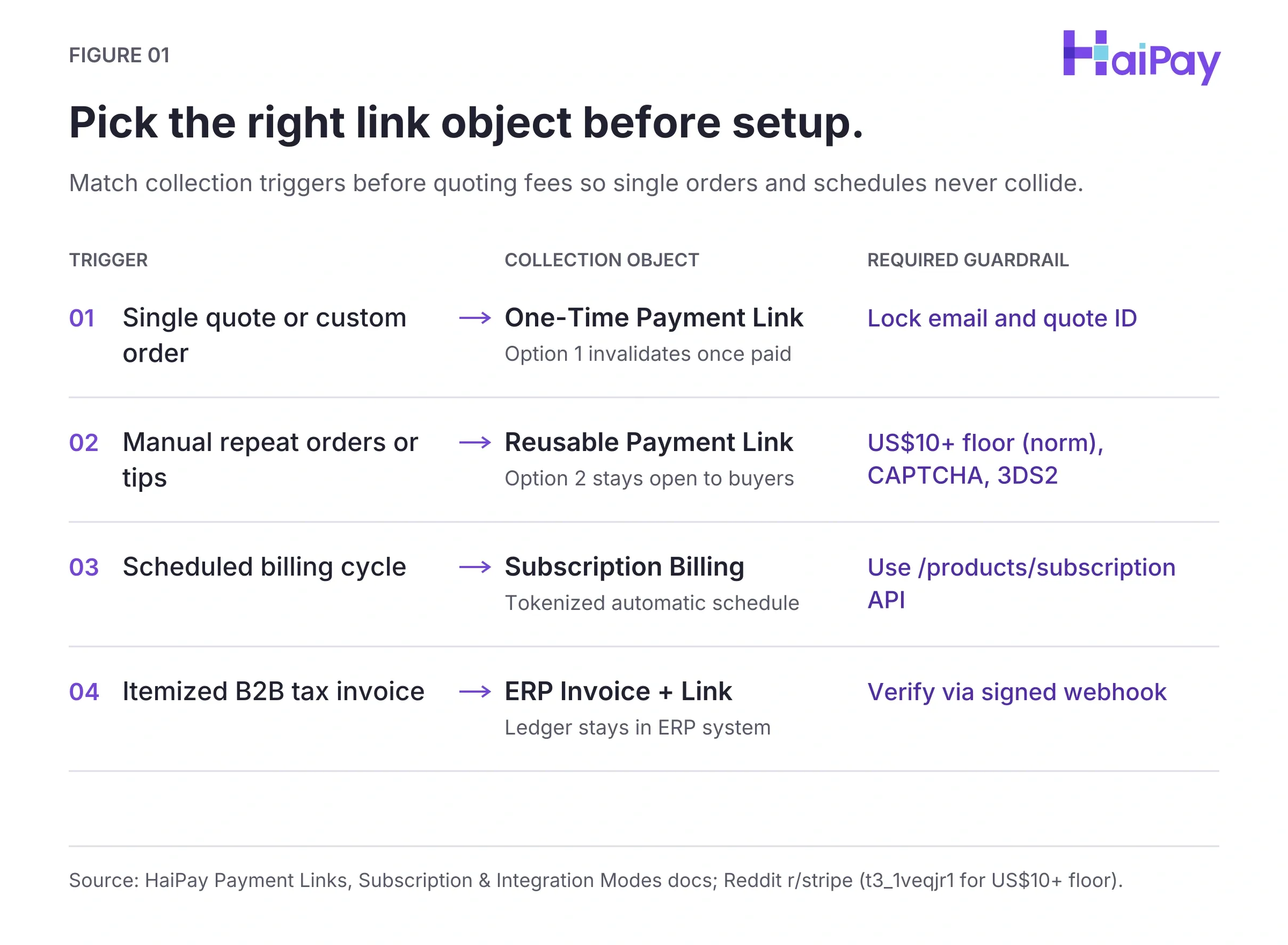
Figure 1: Object selection across link modes (Open full-size diagram).
Source: Official "Payment Links" & "Integration Modes" (2026-11-12; accessed 2026-11-17).
Payment Link Object Comparison by Checkout Use Case
Checkout Model | Lifecycle Rule | Target Use Case | Required Guardrail |
|---|---|---|---|
One-Time Payment Link | Invalidates once paid | Business-to-business (B2B) quotes, single orders | Lock payer email and quote ID |
Reusable Payment Link | Stays active for repeat use | Repeat buyers, tips, fixed tiers | Operator-practiced floor (e.g., US$10+), bot filter (CAPTCHA), and 3-D Secure version 2 (3DS2, buyer auth) |
Automated Subscription | Tokenizes card for auto-billing | Software as a Service (SaaS) plans, memberships | Use subscription billing APIs |
ERP Invoice Workflow | Attaches one-time URL to bill | Accounts receivable (AR) Portable Document Format (PDF) bills | Reconcile via signed server webhook |
Source: Official "Payment Links", Adyen "Create Payment Links" (accessed 2026-11-17), and Reddit r/stripe reports (VOC t3_1veqjr1 for US$10+ floor).
Step 2 — Configure Core Fields and Lock Parameters Before Copying the URL
Complete Know Your Business (KYB, merchant verification) and public legal pages before creating live links. Adyen blocks live links until a Terms and Conditions URL is saved.
HaiPay's 3-step dashboard creates a link (amount, description, one-time or recurring), accepts cards/wallets/local rails, and exports records. Internal portal labels remain unverified outside live accounts, so check user interface (UI) toggles during onboarding. Hosted redirects match Self-Assessment Questionnaire A (SAQ A, lightest Payment Card Industry [PCI] tier).
- Separate test and live keys: Keep sandbox and production application identifier (
appId) values isolated; sharing fails. - Set descriptions and currency rules: Add order references for buyer statements. Stripe
prefilled_amountapplies only to pay-what-you-want links (no fixed-price effect), locking default currency and limiting multi-currency conversion. - Control methods per link: In Checkout Mode API calls,
inBankCodeandpaymentMethods(e.g.GOOGLE_PAY,CREDIT_CARD) are mutually exclusive. - Lock identity and tracking: Use
locked_prefilled_emailinstead of editableprefilled_email. Keeputm_*Urchin Tracking Module (UTM) tags up to 150 chars andclient_reference_idup to 200 chars, omitting secrets.
Verified Operational Limits and Parameter Controls Across Providers
Provider | Creation & Edit Limits | Expiry & Attempt Caps | URL, Tax & Embed Rules |
|---|---|---|---|
HaiPay | 3-step dashboard; | Isolated | SAQ A equivalent; 5 Internet Protocol (IP) callbacks; |
Stripe | 20 flat-rate line items; 20 fonts; no iOS open-amount create | Deactivate by payment count limit + notice |
|
Adyen | Customer Area skips buy now, pay later; 90d view; personally identifiable information (PII) role | 24h default, 70d max; 5 failed tries lock; | Terms URL required; iframe banned Nov 1, 2025; Automated Clearing House (ACH) B2B-only |
Square | Up to 2 custom fields; absent in Invoices, Restaurants, and Appointments apps | Manual deactivate/delete in Dashboard and point of sale | Tax and shipping disabled on international orders |
PayPal | Live-editable URL; 200+ markets / 130+ currencies; flexible buyer amounts | No public expiry/attempt cap documented | Domestic US: 2.99% + US$0.10 cards; 3.49% + US$0.10 PayPal/Venmo (+ intl % & fixed fee) |
Squarespace & GoDaddy | Squarespace freezes non-Title edits post-sale; GoDaddy creates channel links | Squarespace blocks paid delete; GoDaddy: no expiry cap documented | GoDaddy Free (US$0/mo) & Pay Links Plus (US$9.99/mo annual, US$11.99 monthly); 1.75% same-day payout |
Source: Official Docs ("Payment Links", "Checkout Mode", "Integration Modes", "Callback" 2026-11-16, "Onboarding" 2026-11-11); Stripe ("Overview", "Create", "Customize", "Track"); Adyen ("Pay by Link", "Create", "Customer Area", "API", "Methods"); Square; PayPal; Squarespace (2026-04-13); GoDaddy (accessed 2026-11-17).
Step 3 — Prevent Card Testing, Stale Quotes, and Fee Surprises
Open variable-amount links attract card-testing bots running tiny stolen-card probes. Stripe flags spikes in Hypertext Transfer Protocol (HTTP) 402 declines as bot signals.
- Consider an operator floor (e.g., US$10+): Merchants (Reddit r/stripe t3_1veqjr1—an operator norm, not a mandatory processor rule) set US$10+ floors plus name, email, and invoice ID.
- Enforce CAPTCHA, rate limits, and 3DS2: Layer server-side CAPTCHA filters, IP throttling, and 3DS2 checks; see chargeback rules.
- Expire stale quotes: Match due dates and revoke old links. Adyen defaults to 24h expiry (70d max) and locks after 5 failed tries.
Check fee margins before quoting. Under HaiPay's US entity, US-issued cards start from 2.5% + US$0.30 per transaction after business and risk review. Non-US cards start from 4.0% + US$0.30, which includes the +1.5% cross-border surcharge per written quote.
Local payment methods (LPMs, wallets/bank rails) start from 1.2% (e.g., Quick Response Code Indonesian Standard [QRIS] in Indonesia) across 150+ methods per quote. Currency conversion (FX) starts from 0.5% per pair, with US$0 setup, annual, and monthly minimums. Subject to business and risk review, refunds cost US$0.30 per processed refund, disputes US$20 per dispute, and US dollar (USD) wires US$15 per wire (recipient bears intermediary fees). See pricing and fee calculator (quotes exclude FX, refunds, disputes, wires, taxes).
Source: Stripe "Card Testing"; Adyen "Create Links"; Official "Pricing" & "Payment Links" (accessed 2026-11-17); Reddit r/stripe (VOC t3_1veqjr1 for US$10+ floor).
Step 4 — Run Channel QA Before Sending by Email, Chat, QR Code, or Embed
Email, text message (SMS), Quick Response Portable Network Graphics (QR PNG) images, and embeds add channel risks. As of October 2026, the UK National Cyber Security Centre (NCSC) logged more than 60.5 million reports and removed 267.3 thousand scams across 472,300 URLs. The US Federal Trade Commission (FTC) warns against unexpected payment-update links.
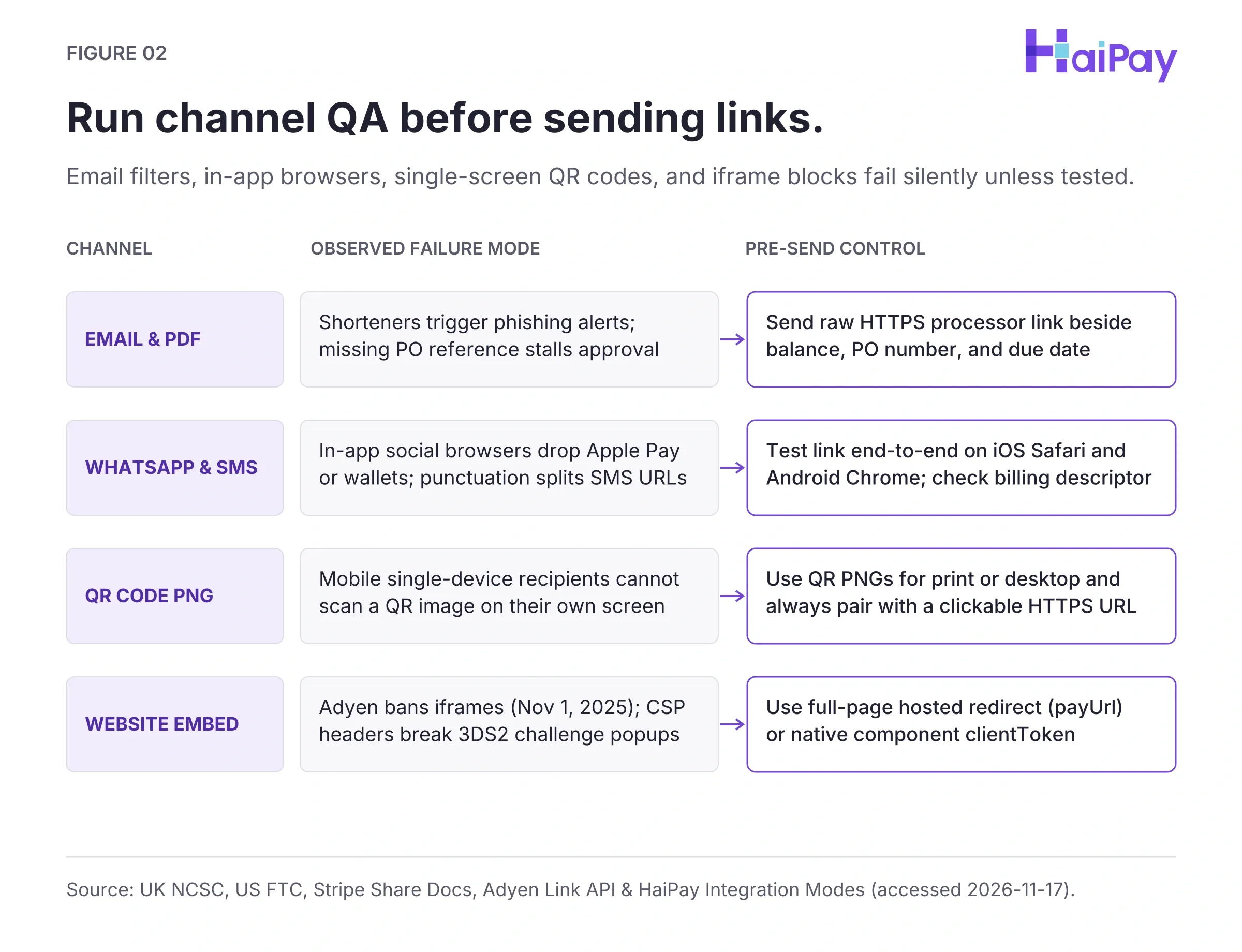
Figure 2: Channel failure points vs. pre-send controls (Open full-size diagram).
Source: UK NCSC (Oct 2026); US FTC (Sep 2022); Stripe "Share"; Adyen "Pay by Link API" (accessed 2026-11-17); Reddit r/stripe (VOC t3_1veqjr1).
Channel Delivery Quality Assurance Matrix
Channel | Common Failure Mode | Pre-Send Verification Action |
|---|---|---|
Email & Invoice PDF | Shorteners look fake; missing purchase order (PO) stalls approval | Send raw Hypertext Transfer Protocol Secure (HTTPS) processor URL beside balance, PO, and due date |
WhatsApp, SMS & Social | In-app browsers break wallets; bio URLs draw bots | Test iOS Safari and Android Chrome; check descriptor |
QR Code PNG | Mobile buyers cannot scan a QR PNG on one screen | Use QR PNGs on print/desktop; pair with clickable URL and compare static vs. dynamic QR codes |
Website Embed | HTML iframes fail Content Security Policy (CSP) or 3DS2 popups | Use |
Source: Stripe "Share"; Adyen "Pay by Link API"; UK NCSC (Oct 2026); US FTC (Sep 2022); Official "Integration Modes" (accessed 2026-11-17).
- Inspect live vs. test sandbox separately: Open the live checkout URL without submitting payment to confirm currency, amount lock, and enabled rails. Run test payments and webhook checks only in an isolated sandbox.
- Illustrative buyer message template: Send raw HTTPS links with context, such as: "Invoice INV-1042 for US$1,250.00 is ready via our official checkout URL before 2026-11-24; confirm the checkout domain first."
Step 5 — Confirm Orders via Signed Webhooks Before Fulfillment
Browser redirects such as callBackUrl show thank-you screens only and never prove cleared funds. Buyers may close tabs early, and Stripe notes bank debits or vouchers clear in 2 to 14 days. Check SEPA payment rules for Single Euro Payments Area (SEPA) transfers; Adyen limits Automated Clearing House (ACH) links to B2B mandates. Signed webhooks validate JavaScript Object Notation (JSON) server-to-server POST pushes using 2048-bit Rivest-Shamir-Adleman (RSA) signatures (SHA256WithRSA) or signature headers.
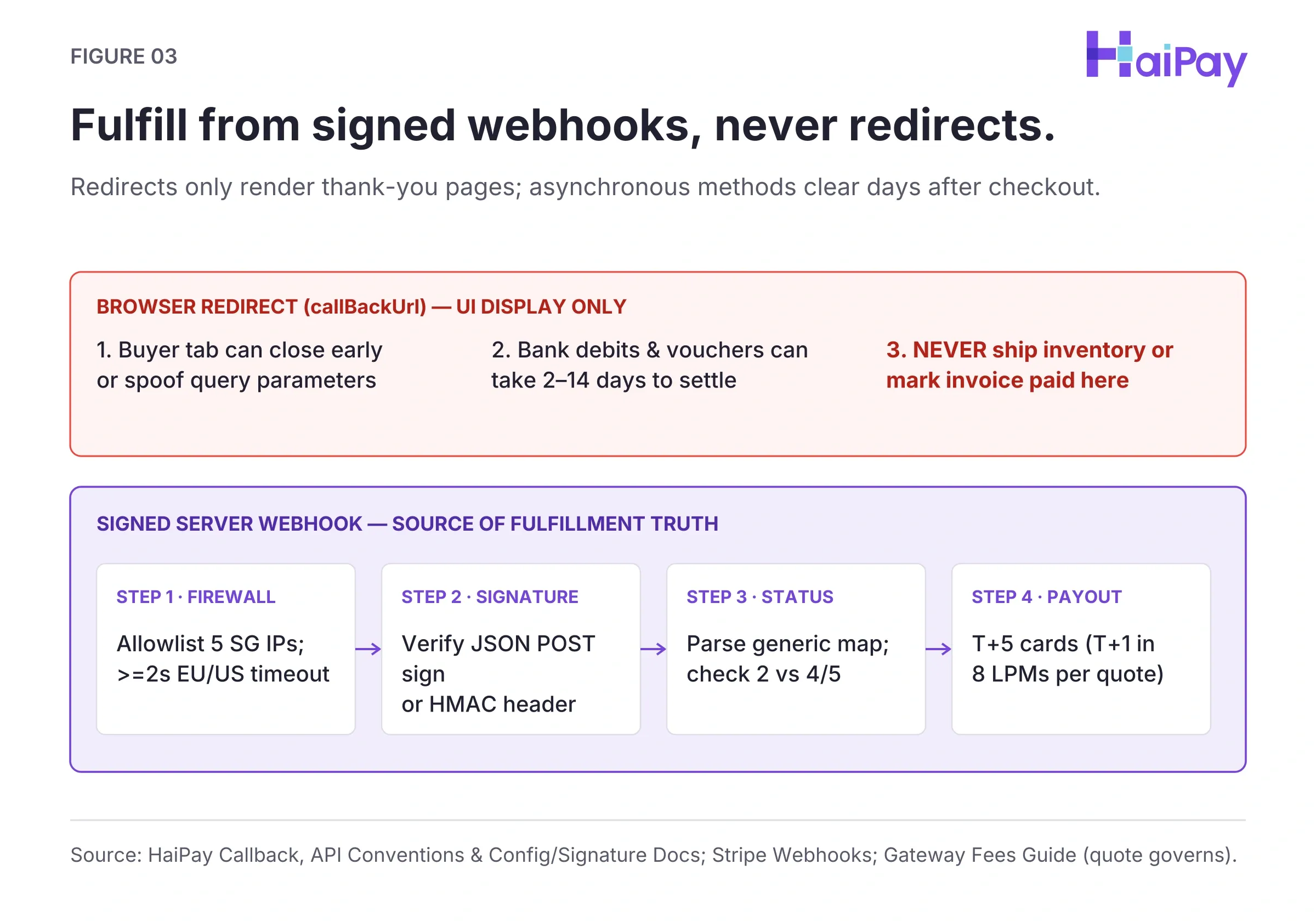
Figure 3: Browser redirects vs. signed server webhooks (Open full-size diagram).
Source: Official "Callback", "Onboarding", "API Description", "Config & Signature"; Stripe "Create" & "Webhooks"; Adyen "Supported Methods"; Official Platform & Fees Guide (updated 2026-11-10; accessed 2026-11-17).
- Allowlist IPs and set >=2s timeouts: HaiPay sends callbacks from five Singapore IPs (
110.239.95.6,190.92.219.18,3.1.75.76,18.139.35.242,46.137.244.95), needing >=2s Europe or Americas HTTP timeouts. - Verify signatures and return HTTP 200: Verify the JSON POST body
SHA256WithRSAsignfield or Stripe's raw-body Hash-based Message Authentication Code (HMAC,Stripe-Signature) HTTP header before updating ERP state. Return HTTP 200 fast; callback delivery retries 5x every 5 minutes. - Parse generic maps and check status: Avoid rigid Plain Old Java Object (POJO, fixed code class) bindings. Parse generic JSON maps and check
status(2 Success, 3 Fail, 4 Partial, 5 Excess),linkNo, andlinkName. - Separate confirmation from payout days: Standard card payouts settle typically T+5 calendar days (five days post-transaction; T+7 forex), per business review and quote. Eligible LPMs settle as fast as T+1 in Indonesia, Vietnam, Thailand, the Philippines, India, Brazil, Mexico via Sistema de Pagos Electrónicos Interbancarios (SPEI), and Bangladesh per our gateway fees guide.
Source: Official "Onboarding" (2026-11-11), "Callback" (2026-11-16), "API Description" (JSON POST sign; 2026-11-11), "Config & Signature" (2048-bit RSA; 2026-11-11). Official "Platform" & "Fees Guide" (updated 2026-11-10, supplied 2026-10-15); Stripe "Create" & "Webhooks"; Adyen "Supported Methods" (accessed 2026-11-17).
Pre-Send Payment Link QA Worksheet (22-Row CSV)
Complete all 22 rows across Blocks A–E before sharing links: Download the 22-Row Payment Link Creation & Channel QA Checklist (CSV).
Launch no-code links across cards and 150+ local methods? Visit HaiPay Payment Links for a quote or our Governance Guide.
Disclosure: HaiPay publishes this guide and offers Payment Links alongside other processors; third-party specs reflect official public documentation accessed 2026-11-17, not live benchmarking. This tutorial provides operational education—not financial, investment, legal, or tax advice—so verify PCI SAQ scope, local tax rules, and binding rates in a signed merchant quote (verified 2026-11-17).
Sources
- Official Product: Payment Links (accessed 2026-11-17).
- Official Pricing: Gateway Pricing (accessed 2026-11-17).
- Official Platform: Settlement Overview (accessed 2026-11-17).
- Official Guide: Gateway Fees (updated 2026-11-10; supplied 2026-10-15; accessed 2026-11-17).
- Official Docs: Checkout Mode (modified 2026-11-12; accessed 2026-11-17).
- Official Docs: Integration Modes (modified 2026-11-12; accessed 2026-11-17).
- Official Docs: Callback (modified 2026-11-16; accessed 2026-11-17).
- Official Docs: Onboarding (modified 2026-11-11; accessed 2026-11-17).
- Official Docs: API Description (modified 2026-11-11; accessed 2026-11-17).
- Official Docs: Config & Signature (modified 2026-11-11; accessed 2026-11-17).
- Stripe: Links Overview (accessed 2026-11-17).
- Stripe: Create Link (accessed 2026-11-17).
- Stripe: Share Link (accessed 2026-11-17).
- Stripe: Customize Link (accessed 2026-11-17).
- Stripe: Track Link (accessed 2026-11-17).
- Stripe: Card Testing (accessed 2026-11-17).
- Stripe: Webhooks (accessed 2026-11-17).
- Adyen: Pay by Link (accessed 2026-11-17).
- Adyen: Create Links (accessed 2026-11-17).
- Adyen: Customer Area (accessed 2026-11-17).
- Adyen: Link API (accessed 2026-11-17).
- Adyen: Supported Methods (accessed 2026-11-17).
- Square: Checkout Links (accessed 2026-11-17).
- PayPal US: Payment Links (accessed 2026-11-17).
- Squarespace: Pay Links (updated 2026-04-13; accessed 2026-11-17).
- GoDaddy: Pay Links (accessed 2026-11-17).
- UK NCSC: Phishing Scams (Oct 2026; accessed 2026-11-17).
- US FTC: Avoid Phishing Scams (Sep 2022; accessed 2026-11-17).
FAQ
Log in to a verified merchant processor dashboard after completing Know Your Business (KYB) onboarding and publishing live Terms and Conditions. Choose single-use or reusable mode, set the amount and currency, and share the hosted URL via email, chat, Portable Document Format (PDF) invoice, or Quick Response (QR) code.
A one-time link expires as soon as the customer completes payment, preventing duplicate billing on single orders. A reusable link stays active for manual repeat buyer payments. Automated recurring billing cycles belong on a dedicated subscription billing system instead.
Editable URL parameters allow buyers to pay with personal email addresses, breaking automated accounts receivable matching. Pass read-only fields such as
locked_prefilled_emailor an alphanumeric order reference up to 200 characters, and never place secrets inside query strings.Consider an operator-recommended minimum floor (such as US$10+ where supported—an anti-carding norm, not a mandatory processor threshold) and require customer email and invoice identifiers. Layer server-side challenge-response bot filtering (CAPTCHA), Internet Protocol (IP) rate caps, failed-attempt auto-expiry (such as Adyen's 5-attempt lockout), and 3-D Secure version 2 (3DS2, cardholder identity authentication) to block HTTP
402enumeration spikes.Yes, after verifying channel trust and mobile usability. Place the full Hypertext Transfer Protocol Secure (HTTPS) processor URL beside the invoice total, purchase order (PO) number, and exact due date rather than using URL shorteners. Always display a clickable URL beside any Quick Response (QR) image.
Buyers can close mobile tabs before redirecting, and bank debits or vouchers can take 2 to 14 days to clear. Wait for a signed server webhook (automated server payment confirmation) such as
notifyUrl, verify its signature and payment status, and return HTTP 200 before shipping.Under HaiPay's US entity, US-issued cards start from 2.5% + US$0.30 and non-US cards start from 4.0% + US$0.30. Local payment methods (LPMs) start from 1.2%, currency conversion (FX) starts from 0.5%, and setup and annual fees are US$0 after business and risk review. Standard cards settle typically T+5 calendar days (five days after transaction; T+7 forex), confirmed in your quote excluding FX, refunds, disputes, wires, and taxes. Eligible LPMs settle as fast as T+1 in Indonesia, Vietnam, Thailand, the Philippines, India, Brazil, Mexico via Sistema de Pagos Electrónicos Interbancarios (SPEI), and Bangladesh per quote.
